

What Radar Shows
Topology: Full Knative Serving chain - Route → KnativeService → Configuration → Revision → Deployment → Pod. Eventing flow - PingSource → Broker → Trigger → subscriber target. See how traffic is split across revisions, which configurations are active, and how events flow from sources through brokers to triggers. Event destinations retain the reference’s API group, kind, namespace and name. Missing or conflicting identity remains unresolved rather than borrowing a same-named core Service.Trigger.spec.brokerRef uses its explicit Broker namespace and name; the older spec.broker field remains local to the Trigger. Channel objects and their observed backing channels are separate resources, and cached owner references establish their management links.

Knative in Topology View - Serving chain and Eventing flow
- Status with URL and ingress readiness
- Latest ready and latest created revision links
- Scaling configuration (min/max scale, concurrency, timeout)
- Traffic split across revisions with percentage bars
- Container template (image, ports, env, resources)
- Conditions (Ready, RoutesReady, ConfigurationsReady)
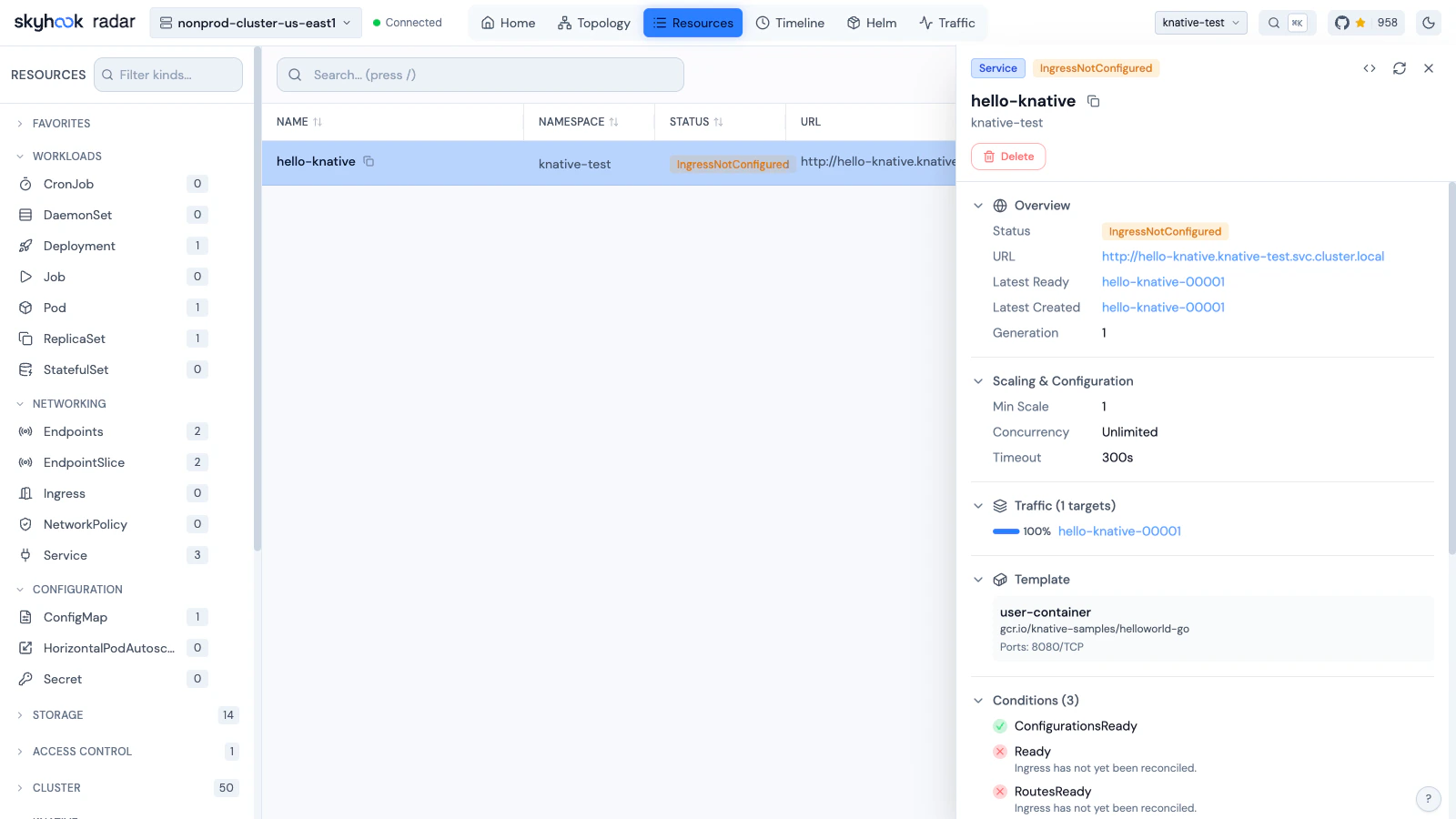
KnativeService Detail View - URL, scaling, traffic splits, and conditions
- Container image with tag
- Concurrency model and container concurrency limit
- Timeout and scaling bounds (min/max)
- Traffic percentage (active vs inactive)
- Conditions (Ready, ContainerHealthy, ResourcesAvailable, Active)
- URL and domain
- Traffic targets with revision names and percentage distribution
- Conditions (Ready, AllTrafficAssigned, IngressReady)
- Latest created and latest ready revision references
- Generation tracking
- Conditions (Ready)
- Address (internal URL for event delivery)
- Delivery configuration (dead letter sink, retry, backoff)
- Conditions (Ready, Addressable, FilterReady, IngressReady, TriggerChannelReady)
- Broker reference
- Subscriber target (service, URI, or Kubernetes reference)
- Event filter attributes
- Delivery configuration (dead letter sink)
- Conditions (Ready, BrokerReady, SubscriberResolved, DependencyReady)
- Sink target reference
- Source-specific configuration:
- PingSource: cron schedule, data payload, content type
- ApiServerSource: API resources watched, event mode, service account
- ContainerSource: container image and arguments
- SinkBinding: subject reference (Deployment, Job, etc.)
- Conditions (Ready, Deployed, SinkProvided)
- KnativeIngress: ingress class, visibility, TLS hosts, rules with path/host routing
- KnativeCertificate: domain names, DNS names, not-after expiry
- ServerlessService: mode (Proxy/Serve), network status
- Sequence: ordered list of steps with subscriber references
- Parallel: branches with filter and subscriber configurations
- Reply/channel template settings