

Run history comes from objects still retained in Kubernetes. It is not durable or all-time execution history.
Definition, run, and execution
Radar separates three concepts that Kubernetes and workflow controllers often present together:- Definition or scheduler - the Job, CronJob, WorkflowTemplate, CronWorkflow, or ScaledJob that describes or launches work.
- Run - one concrete Job or Workflow created from that definition.
- Execution - the Pods, Argo steps, DAG tasks, retries, and fan-out items inside the selected run.
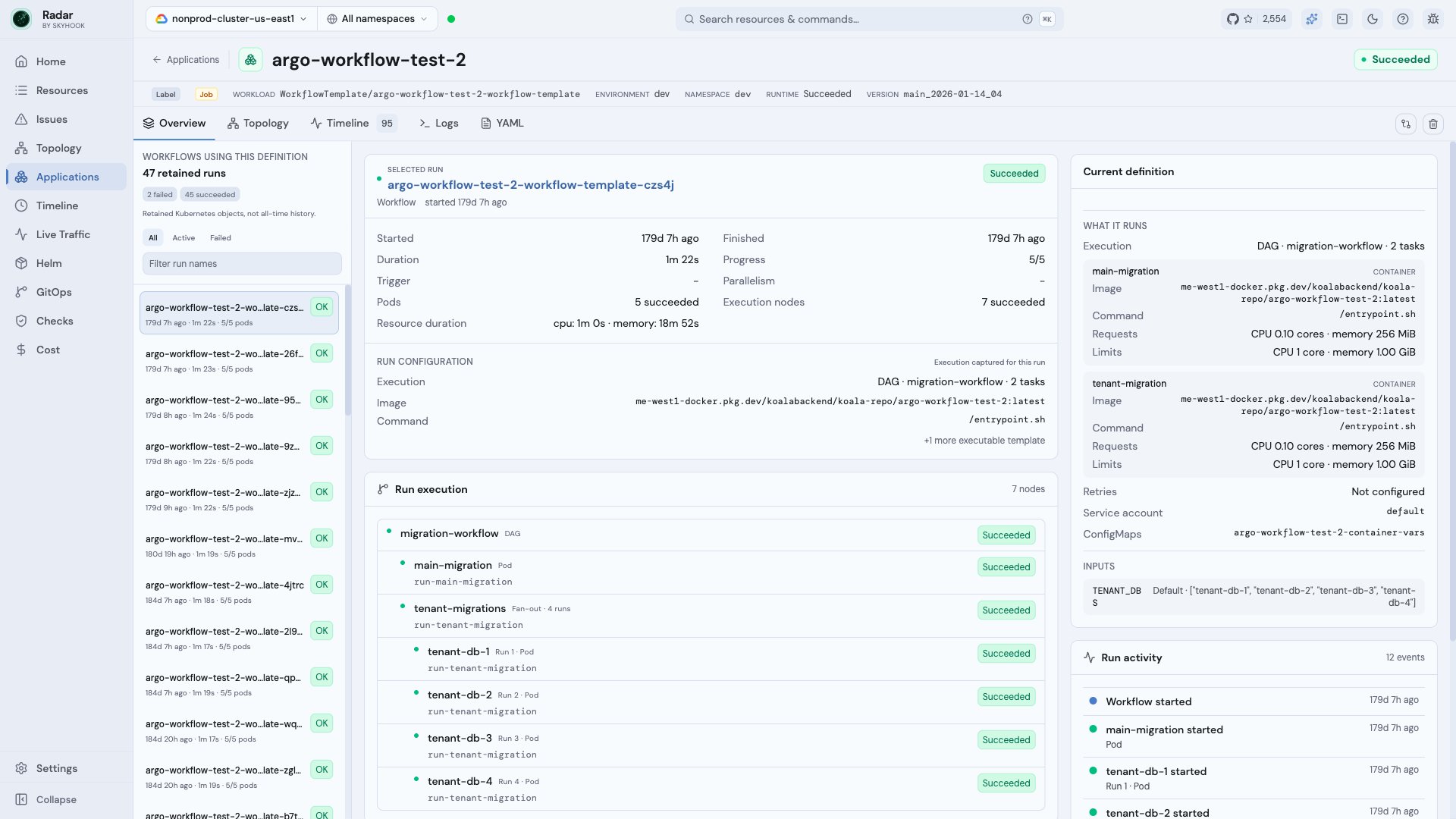
A WorkflowTemplate with retained runs, captured run configuration, semantic DAG execution, inputs, and run activity
Understand what ran
The selected-run card shows timing, progress, Pod outcomes, execution-node outcomes, and resource duration. Run configuration describes the configuration captured for that run, while Current definition shows what the definition contains now. Radar surfaces the operational fields most useful during diagnosis:- container images, commands, and arguments
- CPU and memory requests and limits
- retry, deadline, parallelism, and completion settings
- service account, ConfigMaps, and Secrets
- workflow entrypoint, template references, and input parameters
Follow Argo execution
For Argo Workflows, Run execution converts controller bookkeeping into a readable hierarchy. It preserves authored task and step names while representing:- sequential and parallel Steps
- DAG tasks and fan-out items
- retries and attempts
- nested templates and template references
- skipped, suspended, HTTP, plugin, and ContainerSet work
[0] are omitted when they add no meaning. A fan-out remains grouped, and each item is labeled with its run position or parsed item value where available.
The Overview is an execution tree optimized for diagnosis, not a complete dependency graph. DAG join relationships are preserved in the underlying workflow data but are not rendered as multi-parent graph edges in this view.
Investigate a failed run
Start with the failed row in Run execution, then use Failure details, Run activity, Logs, or Timeline:- Select a failed run from the retained-run rail.
- Find the failed step, task, retry, or Pod under Run execution.
- Expand Failure details when the controller message needs more room.
- Open Logs when the run still has a retained Pod.
- Use Timeline to inspect related resource activity across the workload and its runs.
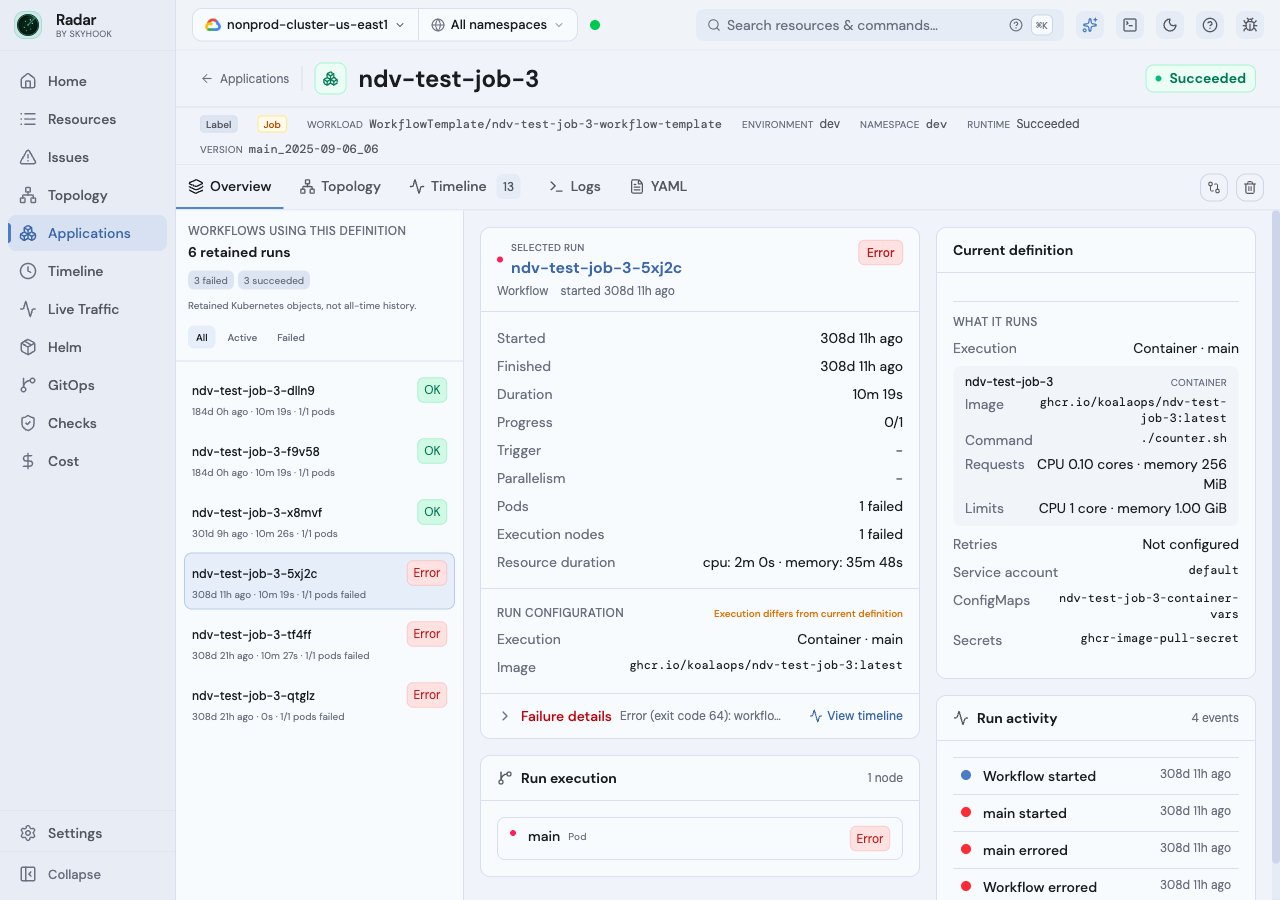
A failed retained Workflow whose Pod is gone, with failure context and a Timeline fallback instead of a misleading Logs action
Scheduled workloads
CronJobs, CronWorkflows, and ScaledJobs use the same run-focused model. The scheduler remains the stable workload, while generated Jobs or Workflows appear as retained runs rather than duplicate applications. The schedule card includes controller-specific settings such as schedule, timezone, concurrency policy, suspension, deadlines, retention limits, and referenced templates where applicable.See also
- Applications - browse workloads grouped into applications.
- Argo Workflows - supported Argo resources and integration details.
- KEDA - ScaledJob and ScaledObject visibility.
- Timeline - inspect retained Kubernetes activity across a workload.