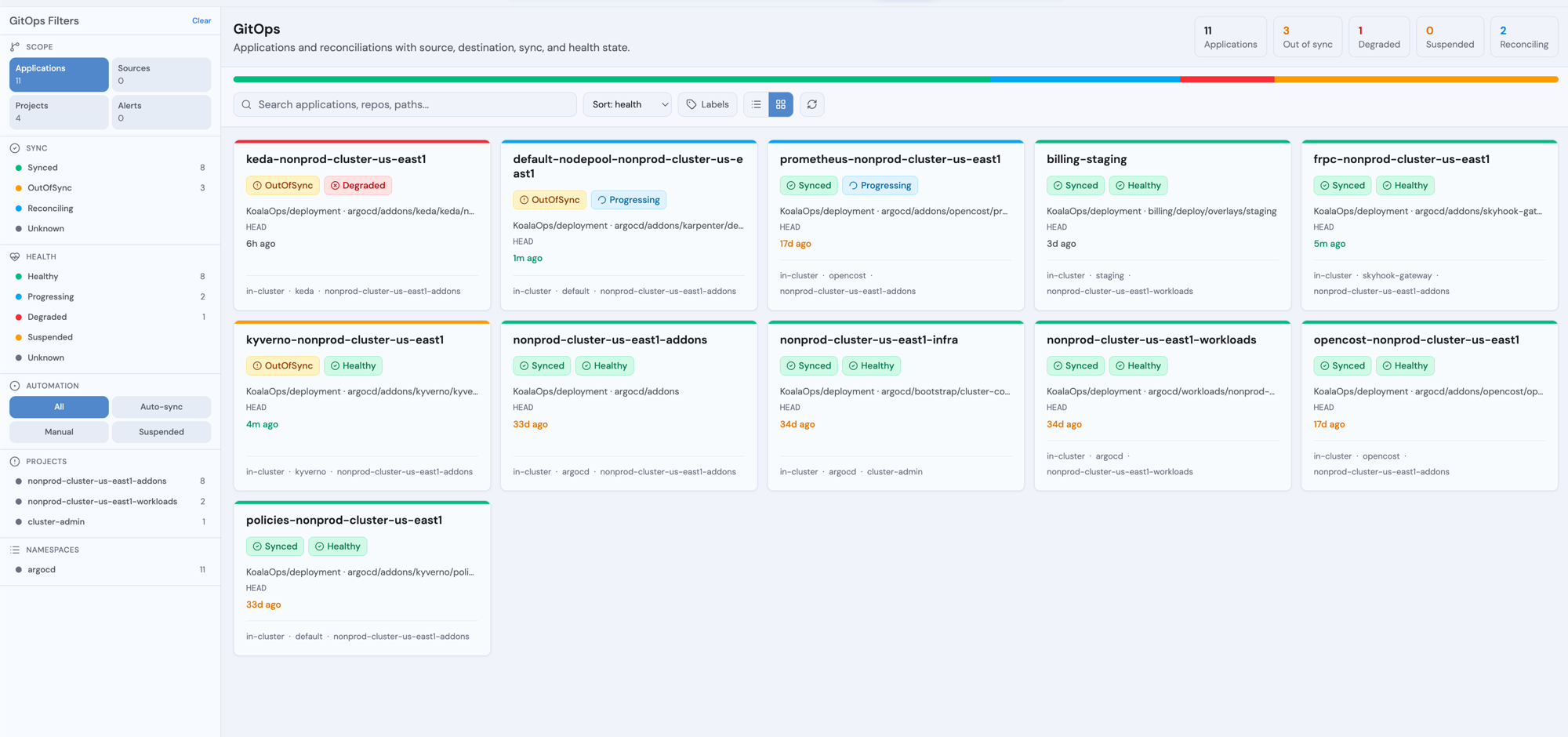
Radar’s GitOps workspace gives Argo CD and Flux first-class treatment. Instead of treating Applications and Kustomizations as generic CRDs, you get a typed fleet view, a per-app detail page that diagnoses why something is misbehaving, and the controls you’d otherwise reach for argocd / flux CLI to run. The hard part of GitOps tooling isn’t sync - it’s diagnosis. Radar surfaces drift, recent events, controller-failure attribution, and lifecycle state inline so you don’t have to context-switch between kubectl get, argocd app diff, controller logs, and a YAML viewer to understand a stuck reconcile.
Radar GitOps fleet view - Argo and Flux applications side-by-side with sync, health, source, destination, and lifecycle state

What’s in the GitOps tab

Open GitOps in the sidebar. Two surfaces:
  • Fleet view - table or tile layout of every Application, ApplicationSet, AppProject, Kustomization, HelmRelease, GitRepository, etc. Argo + Flux rows mix in the same list; the Source column shows the resolved URL (e.g. github.com/argoproj/argocd-example-apps) for both ecosystems, not the CRD-internal source name. Filter by Sync, Health, Project, Namespace, Labels, Automation (auto-sync / manual / suspended), and Lifecycle (active / terminating). Sort columns; switch modes (Applications / Sources / Projects / Alerts).
  • Per-app detail page - opens when you click any row. Three top-level tabs: Topology, Changes, Activity.

Topology tab

Toggle between Graph and Table sub-views. The graph shows the application root and every managed resource it manages, with ownership edges (Service → Deployment → ReplicaSet → Pod chains). Filter by kind, sync, health, role, namespace, or search. Group large pod sets to keep the graph scannable; click a group to expand. GitOps CRs that are themselves managed (an Argo Application inside an ApplicationSet’s tree, a child Application from an app-of-apps parent, a Kustomization referenced by another Kustomization) render with a small Argo or Flux tool badge and a chevron to signal “click to open this CR’s own GitOps detail page.” When you click in, the next page’s breadcrumb shows the lineage - GitOps / parent-ns/parent / child-ns/child - and the parent segment is clickable to navigate back.

Changes tab

Per managed resource, in one row:
  • Sync status chip (Synced, OutOfSync, etc.) with the health chip beside it.
  • Field-level drift computed inline from each resource’s kubectl.kubernetes.io/last-applied-configuration annotation vs. live cluster state. You see actual spec.X removed / spec.Y added entries - no argocd app diff round-trip needed. Radar pulls these live objects via a dedicated direct-GET path so the dynamic informer cache doesn’t have to retain the annotation cluster-wide.
  • Recent events (5 most recent, namespace-RBAC-filtered) so ImagePullBackOff, FailedScheduling, webhook denials, PVC pending, etc. show up next to the resource that caused them.
  • Open to drop into the standard resource drawer.
OutOfSync alerts in the Issues band at top of the page are clickable - they jump straight to the affected row in Changes and highlight it.

Activity tab

Operation history with deploy timestamps, the git revision deployed, who initiated the sync (human user or automation), and per-revision Rollback buttons for Argo. While an operation is in flight, the in-progress entry pins to the top of the timeline.

Diagnosis pipeline

The Issues band at the top of the detail page surfaces six classes of problems:
  • Operation failures (Argo) - the parser recognizes 10+ patterns (annotation-too-large, label-too-long, hook failure, admission webhook denial, RBAC, conflict, immutable field, schema migration, connectivity, etc.) and rewrites each into plain-English causes.
  • Stuck-drift loop - when sync succeeded but the app is still OutOfSync with auto-sync on and a recent reconcile, something is mutating resources after each apply. The Issue calls out the likely culprits (mutating webhook, sibling controller, schema migration).
  • Manual drift without auto-sync - drift exists but auto-sync is disabled. The Issue tells you “nothing will reconcile until you click Sync” so you stop waiting.
  • Argo Application conditions - ComparisonError (verify repo creds), OrphanedResourceWarning, InvalidSpecError, etc. extracted into typed-severity Issues.
  • Per-resource health - Degraded / Missing children get a critical Issue each, deduped against any operation failure that already named the same resource (no triplicate rendering).
  • Pending deletion (lifecycle) - see the next section.
While an operation is running, the page polls every 2s; otherwise on-demand.

Lifecycle awareness: Terminating doesn’t lie about state

When a GitOps resource is being deleted (metadata.deletionTimestamp set), its Sync and Health values are leftovers from the last reconcile before deletion was triggered. Showing them as if they’re current produces contradictory state (“Syncing · Progressing · Terminating”) that misleads operators into trying to fix routine sync problems on a resource the cluster is actively tearing down. Radar treats Terminating as a distinct lifecycle phase that dominates other status:
  • Detail header: an orange [Terminating] chip replaces the Sync/Health badges. The Source / Revision / Last reconcile / Sync mode metadata strip swaps to Pending deletion · Finalizers, with the original fields still accessible behind a “Show pre-deletion metadata” toggle.
  • Action buttons: Sync, Reconcile, Suspend / Resume, Rollback, Sync-with-source disable with a tooltip explaining why (“Disabled - resource is pending deletion (21d)”). Refresh and Terminate stay enabled - they’re read-only / cleanup-only verbs that remain useful.
  • Lifecycle banner: the Issues band hoists a dedicated orange banner above all other issues when the resource is terminating. The pre-deletion failures (UpgradeFailed, RetriesExceeded, etc. - historical noise from before deletion) collapse behind a Pre-deletion issues (N) disclosure, default-closed.
  • Severity ramp: lifecycle severity grows with how long deletion has been pending - info under 5min, warning 5-30min, alert over 30min. Past 30min the Issue’s Cause line names the controller responsible for the finalizer and reports its pod state (“argocd-application-controller is CrashLoopBackOff (2/2 pods)”; “helm-controller is not running in namespace flux-system”), so you can go straight to the actual cause.
  • Fleet view: Terminating rows show in the Sync/Health columns instead of stale values, paint the row stripe orange, promote the [TERMINATING] chip to the leftmost slot before the resource name, and replace the “Last Sync” timestamp with Pending Nago. The sidebar gains a Lifecycle filter (All / Active / Terminating) that only renders when zombies exist.
  • Topology graph: Terminating nodes (the root and any children) render with an orange left-stripe and a single Terminating chip; the (now stale) sync/health chips are suppressed.
  • Cluster Audit: a stuckTerminating check across all typed K8s resources (Pods, Deployments, etc.) flags anything pending deletion past the same warning(5min) / danger(30min) thresholds, so the cluster-wide view agrees with the per-resource Issue on what counts as stuck.
  • Home dashboard: a GitOps Controllers card on Home rolls up Argo CD + Flux controller pod health (3 Argo + 5 Flux controllers detected by static label-selector probe). Hidden entirely on non-GitOps clusters.
The same gates apply to direct API hits and MCP - manage_gitops returns a structured error with the typed sentinel when called against a Terminating resource, so AI assistants don’t suggest Sync on a zombie.

Workflow operations

Argo CD

OperationWhat it does
Sync…Opens a dialog with prune / dry-run / apply-only / force / replace / server-side apply / sync-options. Force-only routes via syncStrategy.hook.force so PreSync / PostSync hooks still run; ApplyOnly uses syncStrategy.apply.
RefreshRe-fetches the source repo.
Hard refreshSets RefreshType=hard to bypass repo-cache.
TerminateCancels an in-flight operation.
Suspend / Enable auto-syncToggles automated sync; remembers the prior prune / selfHeal settings on suspend so resume restores them.
RollbackPick a prior history entry by ID. Force / DryRun flags honored.
Selective syncFrom the Topology tab, mark individual resources and sync only those.

Flux

OperationWhat it does
ReconcileAnnotates reconcile.fluxcd.io/requestedAt to trigger a single reconcile.
Sync with source (Kustomization / HelmRelease)Reconciles the source first, then the resource itself.
Suspend / ResumeToggles spec.suspend.

Keyboard shortcuts (per-app detail page)

KeyAction
sSync (opens the options dialog for Argo) / Reconcile (Flux)
rRefresh (Argo)
Shift+RHard refresh (Argo)
tTerminate running sync (Argo, only when an op is in flight)

Cross-linking from other Radar views

The GitOps tab isn’t the only place Argo/Flux ownership matters. Surfaces across Radar know about GitOps and route into the right detail page when they should:
  • K8s resource drawer - opens a Managed by <app> chip whenever the resource carries Argo’s tracking-id annotation or Flux’s owner labels. Click → owning Application/Kustomization/HelmRelease detail page. The chip is intentionally not driven by the generic app.kubernetes.io/instance label (stamped by virtually every Helm chart, so it would false-positive plain Helm installs).
  • Topology - clicking an Argo Application / Flux Kustomization / HelmRelease node opens its GitOps detail page instead of the generic drawer.
  • Timeline - same routing for lane labels: clicking the lane name on a GitOps CR opens the detail page.
  • Helm view - releases installed by Flux’s helm-controller (detected by looking up the corresponding HelmRelease CR by storage namespace + release name) carry a small Flux badge in the list and a Managed by Flux · ns/name link in the drawer. The link warns that helm upgrade here would be reverted at the next reconcile, so you go to the GitOps tab to make the change.
  • Flux source CR drawers - GitRepository, HelmRepository, OCIRepository, Bucket drawers carry a Consumed by panel listing every Kustomization + HelmRelease whose spec.sourceRef points at the source, with click-through to the consumer’s GitOps detail page. Answers “if I edit this source, what gets affected on the next reconcile?” without guessing.

On the topology graph

Argo Applications and Flux Kustomizations / HelmReleases group their managed resources visually. Click a managed K8s resource to open it in the standard resource drawer; click a managed GitOps CR (a child Application, an inner Kustomization) to open its own GitOps detail page with a lineage breadcrumb back to the parent.

In the timeline

Reconciliation events flow into the Timeline like any other K8s event, plus structured “applied / pruned / failed” entries with the diff of what changed. Lane labels for Argo Applications / Flux Kustomizations / HelmReleases route clicks to the GitOps detail page (see “Cross-linking” above).

Demo cluster for testing

Radar ships a kind-based demo cluster bootstrapper that installs Argo CD + Flux and applies a curated set of fixtures covering every UI state we care about:
make gitops-demo            # bootstrap + apply fixtures
make gitops-demo-drift      # induce stable drift on guestbook-drift
make gitops-demo-down       # teardown
Fixtures cover healthy + drifted + broken-sync + manual-sync + suspended + rollback history + ApplicationSet → 3 children + Flux Kustomization with dependsOn chain + HelmRelease (managed-resources tree) + Flux zombie (Terminating lifecycle) + broken Kustomization (missing namespace) + broken HelmRelease (no-such-version). See scripts/gitops-demo/README.md in the OSS repo for the full matrix.

RBAC

Reading status only needs the default ClusterRole’s read access on argoproj.io / *.toolkit.fluxcd.io (enabled by default in rbac.crdGroups.argo / .flux). Triggering Sync / Reconcile / Suspend / Rollback needs patch on the parent CRDs. The chart enables the right verbs when rbac.helm: true is set, or you can scope it more tightly via rbac.additionalRules. The lifecycle controller-health probe (Home dashboard GitOps Controllers card, finalizer-owner attribution in lifecycle Issues) reads pods in argocd and flux-system. Operators with no access there still get the chip and the basic Issue; the controller-status enrichment is omitted gracefully.

Single-cluster scope

Radar shows GitOps connections only when the controller and managed resources live in the same cluster. ArgoCD’s hub-spoke pattern (controller in one cluster, workloads in another) means Application → resource edges won’t render when you’re connected to the ArgoCD hub. Flux typically deploys to its own cluster, so connections usually work.

See also

  • Topology view - how the wider cluster graph treats GitOps groupings.
  • Resource browser - per-resource sync state chips outside the GitOps tab.
  • Cluster audit - stuckTerminating and other reliability checks across the whole cluster.
  • MCP server - how AI assistants drive GitOps operations and read lifecycle signal via manage_gitops and get_resource.
  • Integrations & CRDs - full CRD support matrix for Argo CD and Flux.