

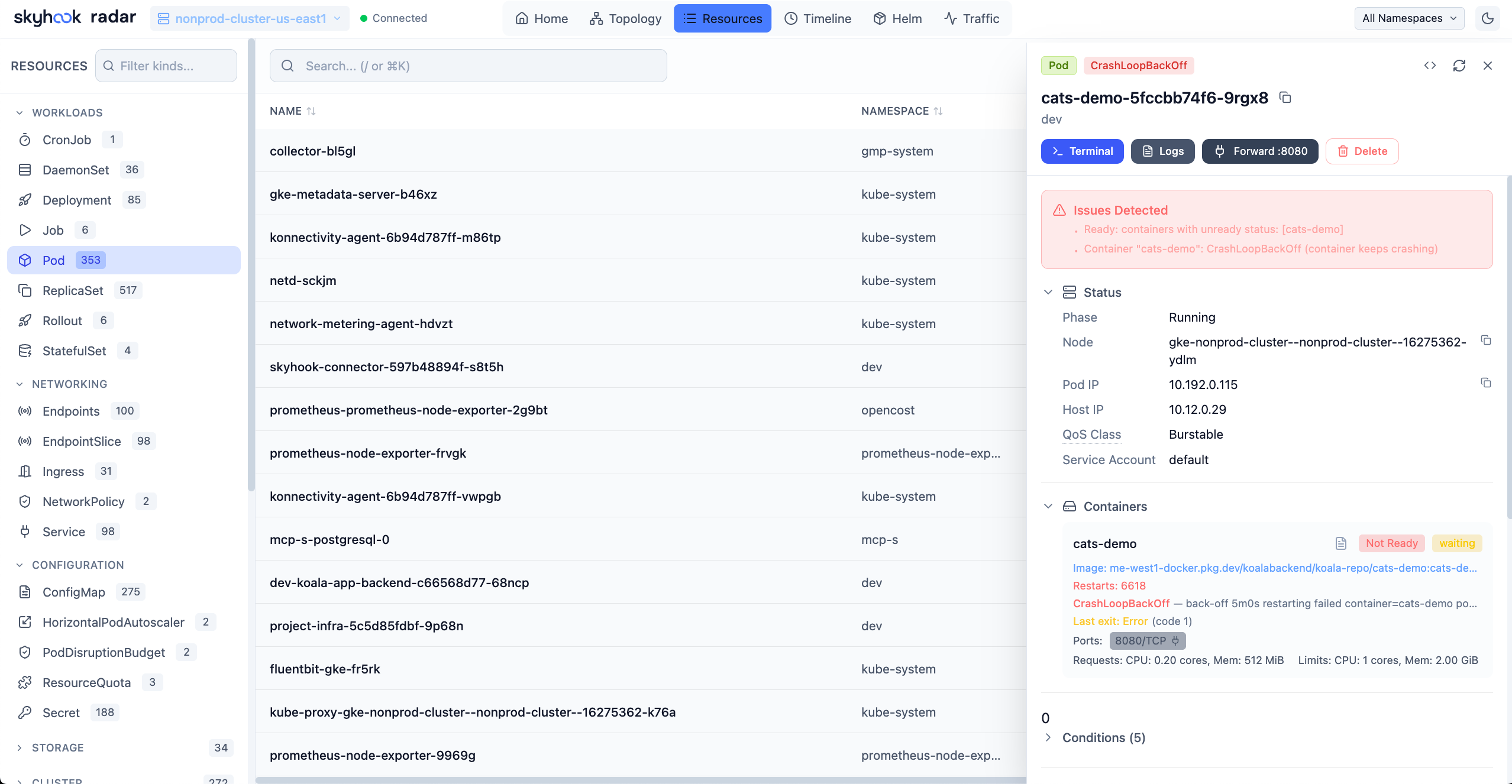
Smart columns
Each resource kind has a curated column set:
For unknown CRDs, Radar falls back to a generic name + age + ready columns and shows the full YAML in the detail drawer.
Kubernetes 1.37 compatibility
When the API server advertises them, Radar adds five Kubernetes 1.37 APIs under Other Kubernetes APIs, covering the upstream Workload API and Pod certificate and cluster trust APIs:scheduling.k8s.io/v1beta1: Workload and PodGroupscheduling.k8s.io/v1alpha3: CompositePodGroupcertificates.k8s.io/v1: PodCertificateRequest and ClusterTrustBundle
ScaledToZero HorizontalPodAutoscaler condition and Unused PersistentVolumeClaim condition. A scaled-to-zero HPA is shown as intentional idling only when Kubernetes reports the condition, minReplicas is zero, and desired replicas are zero. An unused claim gets informational retention guidance rather than a failure or deletion recommendation.
For CPU and memory views, Radar discovers the served metrics.k8s.io API, prefers stable v1, and falls back to v1beta1 while metrics providers migrate. The selected version is shared across pod and node detail, top-resource views, dashboards, history, and AI tools.
Custom columns
Beyond the curated set, you can surface any label or annotation as its own column. Open the column picker (top-right of the table), choose Label or Annotation, and type a key - Radar autocompletes from keys present on the loaded rows, so you don’t have to remember them. Custom columns are first-class: sortable, filterable (with per-value chips), resizable, and removable. They’re remembered per kind in your browser, so the columns you add to Nodes stay on Nodes.Filtering
- Search - free-text across name / labels / annotations / status, with a regex toggle to switch from substring matching to full regular-expression patterns.
- Namespace picker - top-right.
- Kind filter - sidebar; pinned kinds float to the top.
- Label filter - click any label chip in a row to filter by it.
- Status quick-filters - per-kind chips (“Failing”, “Pending”, “OOMKilled”, “ImagePullBackOff”, etc.).
Drilling in
Clicking any row opens the detail drawer, which has tabs depending on the kind:- Overview - the most important fields surfaced
- Pods - on workloads, the live pods grid
- Logs - on workload kinds, aggregated logs across all pods
- Events - K8s events filtered to this resource
- Topology - the resource highlighted on the topology graph
- YAML - read or edit
- Audit - any findings from Cluster audit
- Manifest history - resource changes from the Timeline
Workload actions
Deployment, StatefulSet, DaemonSet, and Argo Rollout detail views expose the actions your Kubernetes RBAC allows: Set image, Restart, Rollback, Logs, and YAML editing.Set container images
Select Set image to change one or more regular or init-container images. Radar loads the current pod template when the dialog opens and applies all selected image changes together. If another actor changes an image before you confirm, Radar rejects the stale update and reloads the current values instead of overwriting the newer value. Confirming the change updates the workload’s pod template. Radar does not issue a separate restart: the Deployment, StatefulSet, DaemonSet, or Argo Rollout controller handles the new template according to its configured strategy. This includes rolling and recreate Deployments, partitioned StatefulSets, and canary or blue-green Argo Rollouts. With an OnDelete strategy, the desired template changes but existing Pods remain until you delete them. A paused Deployment or Argo Rollout saves the template change but does not start rolling out until it is resumed. Supported Argo RolloutworkloadRef targets are updated at the referenced object.
The action appears only when you can patch the object that will actually change. A Rollout backed by workloadRef may also require permission to read that referenced object.
Follow the rollout
After an image change, restart, rollback, or other pod-template update, Radar follows the controller’s live state rather than showing a fixed success message. Resource tables, the detail drawer, and the full workload view report progress, waits, pauses, and failures until the new revision converges. Readiness and rollout activity remain separate. For example, an application can stay fully ready while its stable Pods continue serving and a new revision is still progressing. A failing new Pod is attributed to the rollout without hiding capacity still served by the stable revision.YAML edit
The YAML tab supports inline edit with conflict detection (resourceVersion check). It applies viakubectl apply --server-side semantics. When --disable-helm-write or restricted RBAC takes effect, the editor goes read-only.
Bulk actions
Select multiple rows -Shift + click for a range, the row checkboxes for individual picks, or the b hotkey to toggle bulk-select mode - then scale, restart, delete, or port-forward in bulk. Delete runs through a review-and-confirm step and reports partial failures rather than silently dropping them. The action menu only shows actions allowed by RBAC for every selected resource.
Image filesystem
Click an image reference to open the Image filesystem viewer - browse the layers without pulling locally.See also
- Topology view - the graph of these same resources.
- Cluster audit - inline findings on each row.
- Helm management - chart-level view that complements the resource view.