

api-v2 flaking when api-v1 is healthy?” - questions you’d otherwise answer by exporting two YAMLs and running diff by hand.
Two ways to enter
From a resource detail page. Click the Compare button in the action bar. A picker opens listing every other resource of the same kind. Same-namespace candidates are surfaced first (usually the one you want), with↑↓ arrow keys and Enter for fast keyboard picking.
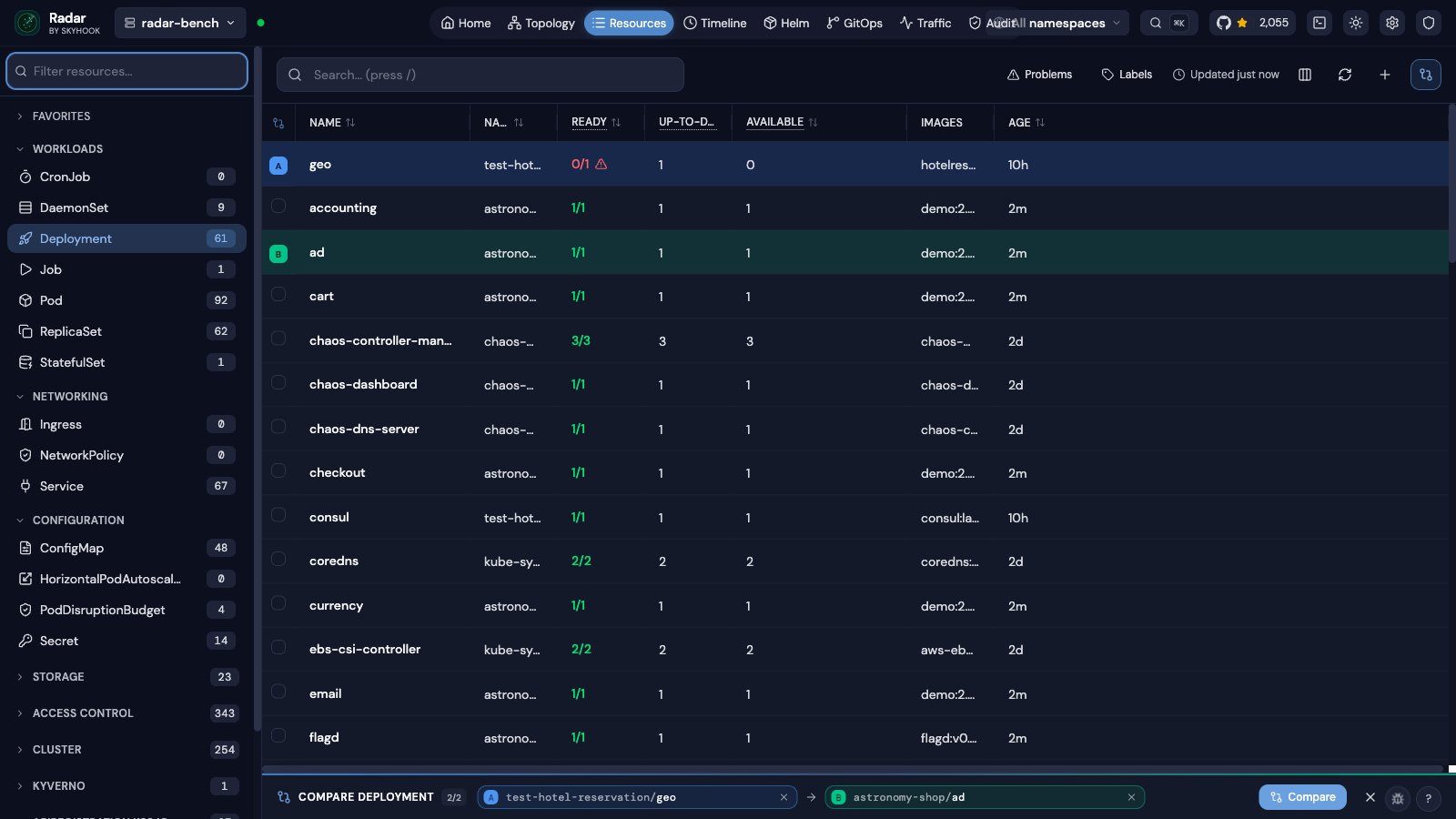
From the resource table. Hit the Compare ⇄ toggle in the table header. The table flips into compare mode - a leading A/B-badge column appears and a sticky tray slides up at the bottom. Click two rows, then hit Compare in the tray.
/compare?kind=&apiGroup=&a=ns/name&b=ns/name (the apiGroup param is only required for CRDs that collide with core kinds).
What the diff shows
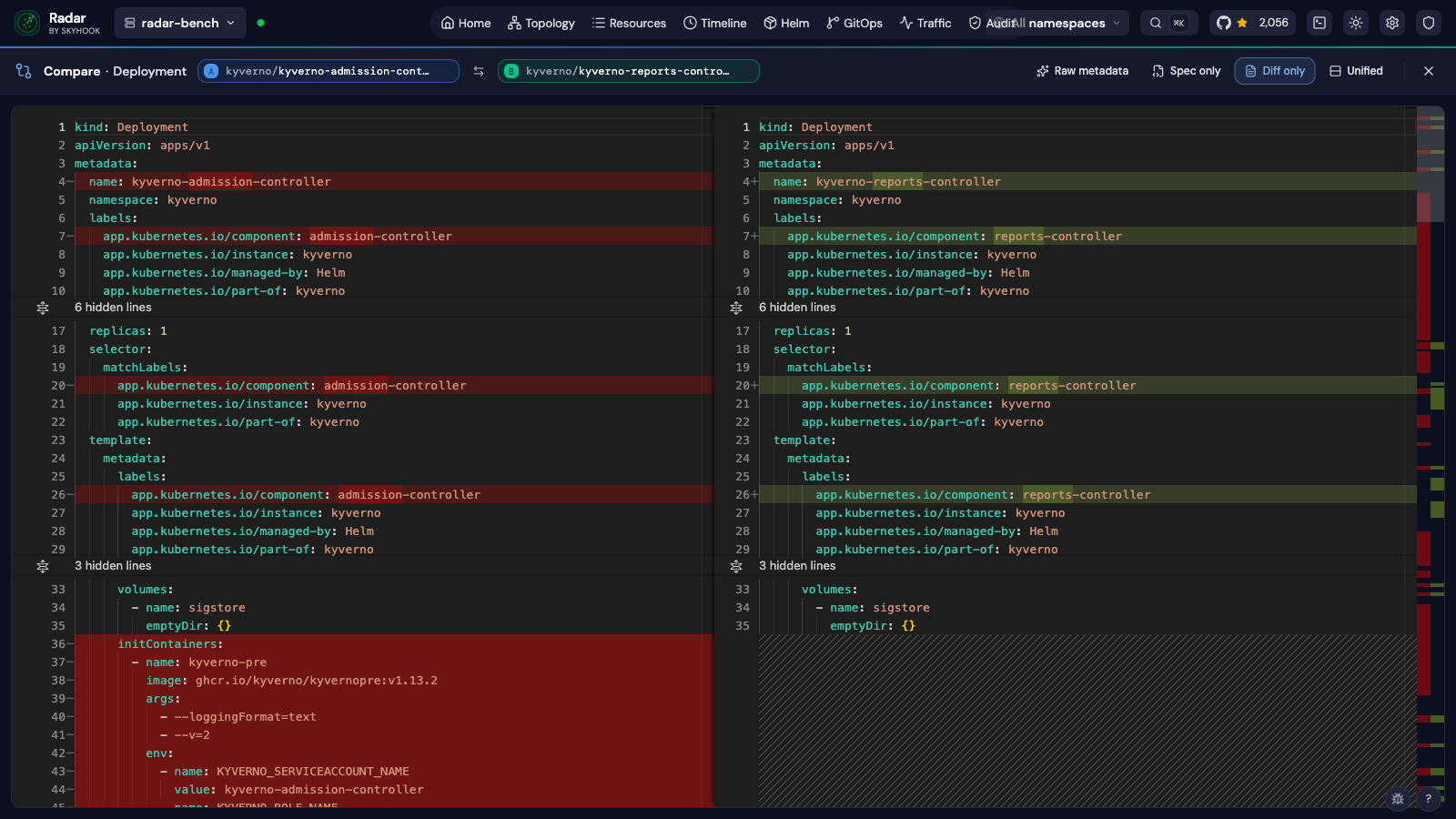
Side-by-side YAML with Monaco’s diff editor. Red lines on the left are present in A but missing or different in B; green lines on the right are present in B but missing or different in A. The overview ruler on the right edge gives you a bird’s-eye map of where the changes are. Four header toggles, each constant-label with a highlight indicating the active state:- Raw metadata - off by default. Keep it off and Radar strips the server-assigned noise listed below (
uid,resourceVersion,managedFields,last-applied-configuration, etc.) before computing the diff. Flip it on if you’re debugging API-level oddities and actually want to see those fields. - Spec only - drops
statusfrom both sides so the diff focuses on intent, not the controller’s view of current state. Useful when one resource is mid-rollout. - Diff only - collapses unchanged regions to a single line. The default; flip it off to see the full YAML for context.
- Unified - switches between side-by-side (default) and a single-column layout with
+/-lines. Unified packs more content per line height; side-by-side reads more like a code review.
What’s stripped before diffing
K8s API responses carry a lot of server-assigned noise that always differs between two resources but doesn’t reflect any meaningful difference. By default - with Raw metadata off - Radar strips it before computing the diff:metadata.managedFields(server-side apply tracking - huge and never interesting in a compare)metadata.resourceVersion,metadata.uid,metadata.generation,metadata.creationTimestamp,metadata.selfLink,metadata.deletionGracePeriodSecondsmetadata.annotations.kubectl.kubernetes.io/last-applied-configuration(massive duplicated JSON blob)metadata.annotations.deployment.kubernetes.io/revisionmetadata.labels.pod-template-hash,metadata.labels.controller-revision-hash
Errors render per side
If A loads but B 404s (a stale share-link is the typical cause), the working side still renders. The failed side’s pill turns red, and a banner names exactly which side failed and what went wrong - click the pencil icon to pick a replacement without rebuilding the URL.Scope of v1
- Same kind only. Comparing a Deployment to a StatefulSet would be more confusing than useful.
- Two-way. Cap is hard-set at 2 picks; selecting a third in the table replaces the oldest so the click always has a visible effect.
- Single cluster. Compare works within one cluster. In Radar Cloud, the fleet Compare page diffs the same kind across two clusters.