

- Local (open source) - Radar drives the agent CLI you already have - Claude Code, Codex, Cursor, or OpenCode - against a read-only tool mount, on your machine, under your existing subscription. No API key, no account.
- Hosted (Radar Cloud) - the investigation runs in Radar Cloud with a Radar-managed agent. Nothing to install, no key to bring; see investigations in Radar Cloud.
Requirements (local)
- Standalone Radar (local, no-auth mode) - the BYO-agent form is not available when Radar runs with authentication enabled; in Radar Cloud you get the hosted form instead
- A supported agent CLI on your
PATH: Claude Code (claude), Codex (codex), Cursor (cursor-agent), or OpenCode (opencode, Radar v1.15.0+). Radar detects installed CLIs automatically; if none is present, the feature stays out of your way
Starting an investigation
From the UI:- The Investigate button on a resource’s detail header - prominent when the resource has a problem, a quiet icon when it’s healthy
- Per-row on the Issues queue
- The top-bar entry, which also shows a live count of running investigations
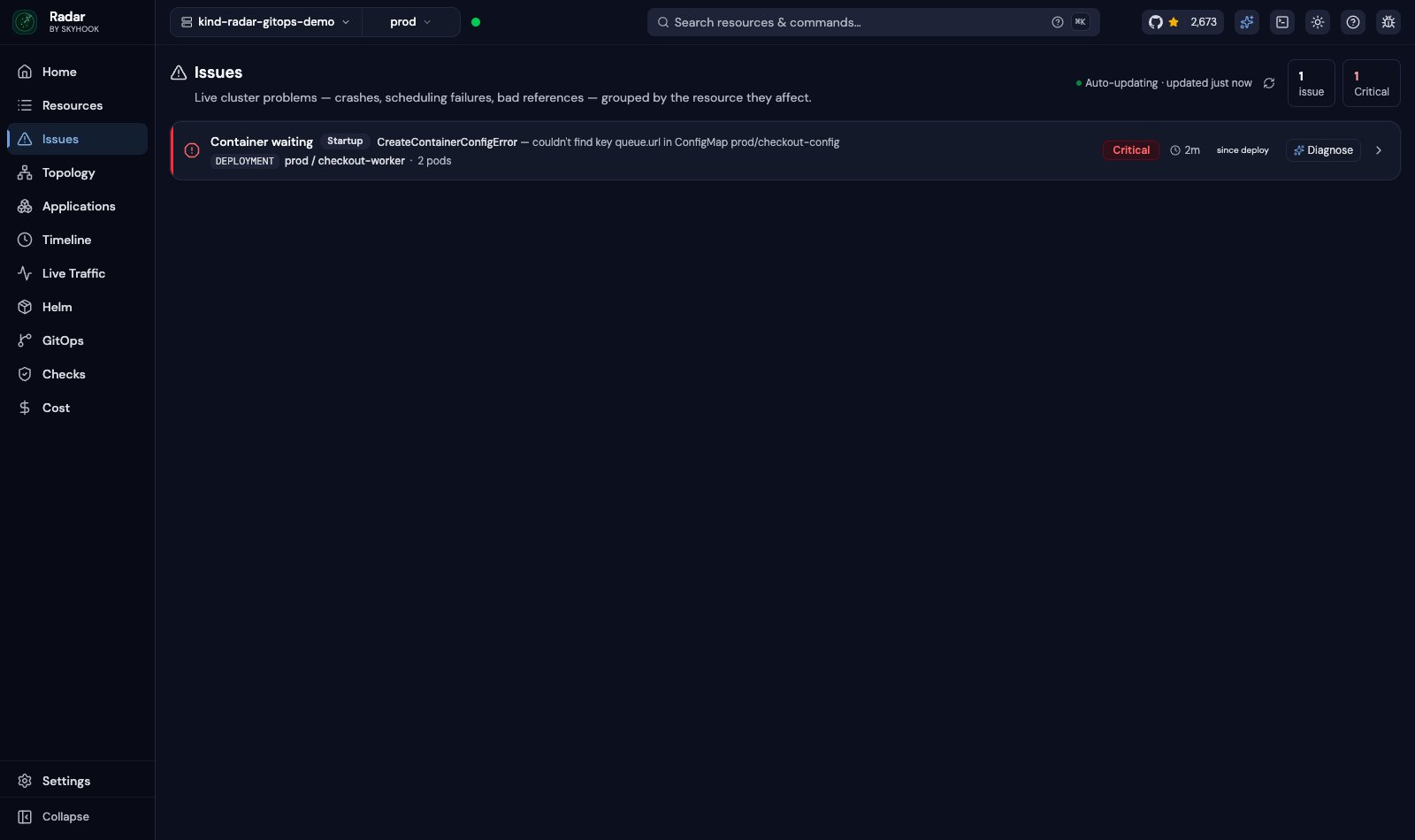
Start an investigation from an issue
During a run
The investigation streams live: the agent’s plan, each tool call with its timing, and a stall hint when the model is thinking. Runs are owned by the server, not the browser tab - close the panel, navigate away, or refresh and the run keeps going. Up to three investigations run concurrently. The tool surface the agent drives is read-only by construction: write tools are not present on the mount, and a regression test fails the build if one leaks in. The agent’s built-in web search is disabled during a run, so what it reads stays between your machine and your model provider. Switching kubeconfig context marks in-flight runs as belonging to a different cluster - they refuse follow-ups and apply rather than answering about the wrong cluster.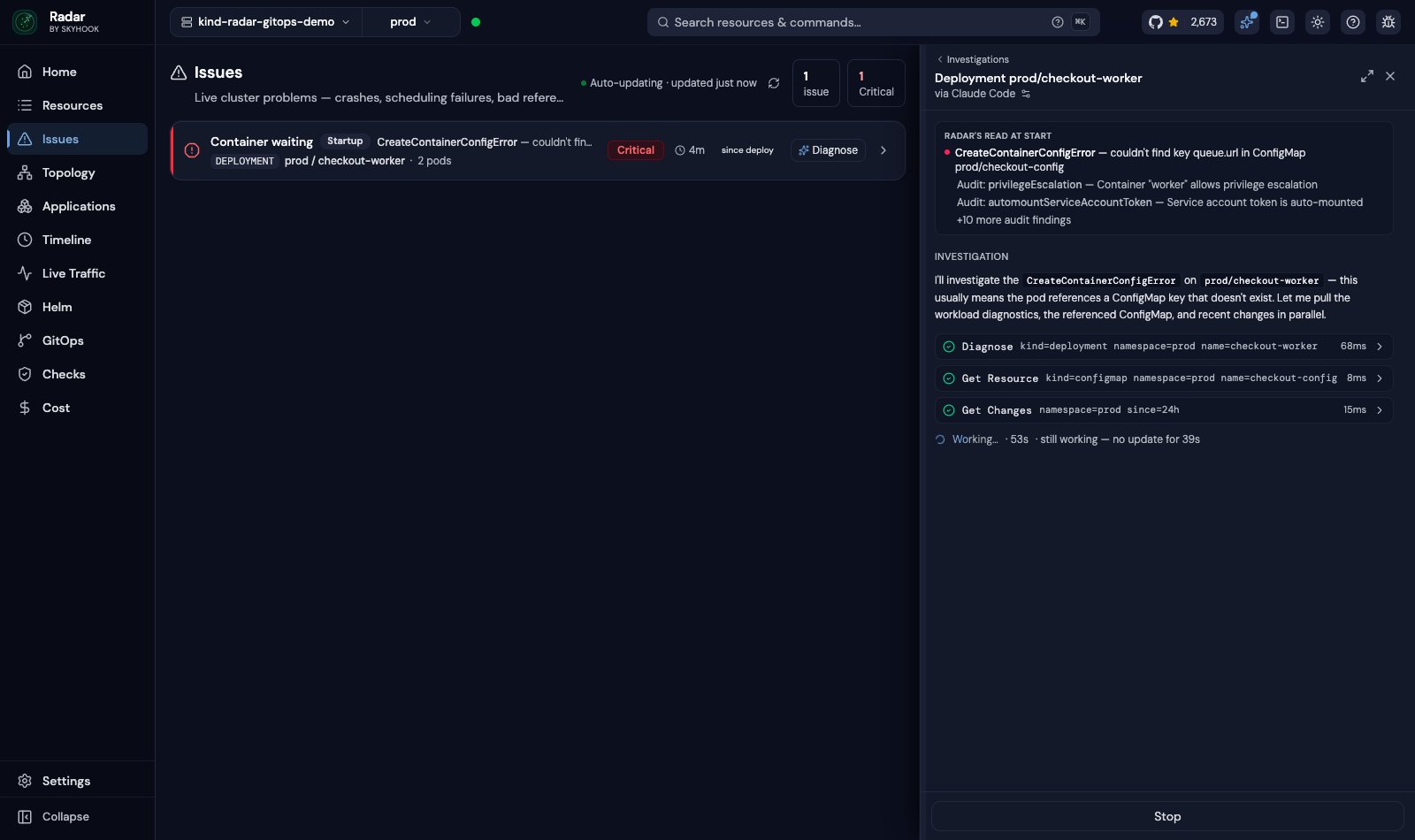
The investigation streams live - every tool call visible as it runs
Findings: the evidence first
As the investigation runs, verified results from the Radar tools the evidence pane understands are collected as Findings - the pane beside the transcript. Depending on which tools the agent calls, that includes the workload’s logs, the alert rules that watch it, the Helm release it came from, the permissions its ServiceAccount holds, and the workload’s vitals - CPU, memory and restarts over the pod set, captured by thediagnose MCP tool when it runs and Prometheus is reachable. The agent is instructed to argue its case over that evidence and cite the findings its claims rest on. A Prometheus range query about the target renders as a chart card with change markers, so “memory doubled at 14:02” is something you can see.
Investigations can use spec edits, NetworkPolicy changes, Secret rotations and stale
environment evidence. Results identify coverage limits; Secret write times from
before Radar started may not establish a data change.
A workload’s HorizontalPodAutoscaler is diagnosed on the workload itself. Evidence that does not cover the HPA is never treated as conclusive about it.
Results
An investigation ends in one of three states:- Root cause - an explanation of what broke, its supporting evidence, and next steps with their rationale
- All-clear - the agent verified the resource is healthy, not merely found nothing; absence of evidence is not treated as health
- Inconclusive - RBAC-denied reads, missing data, or genuinely ambiguous state, stated plainly instead of dressed up as an answer
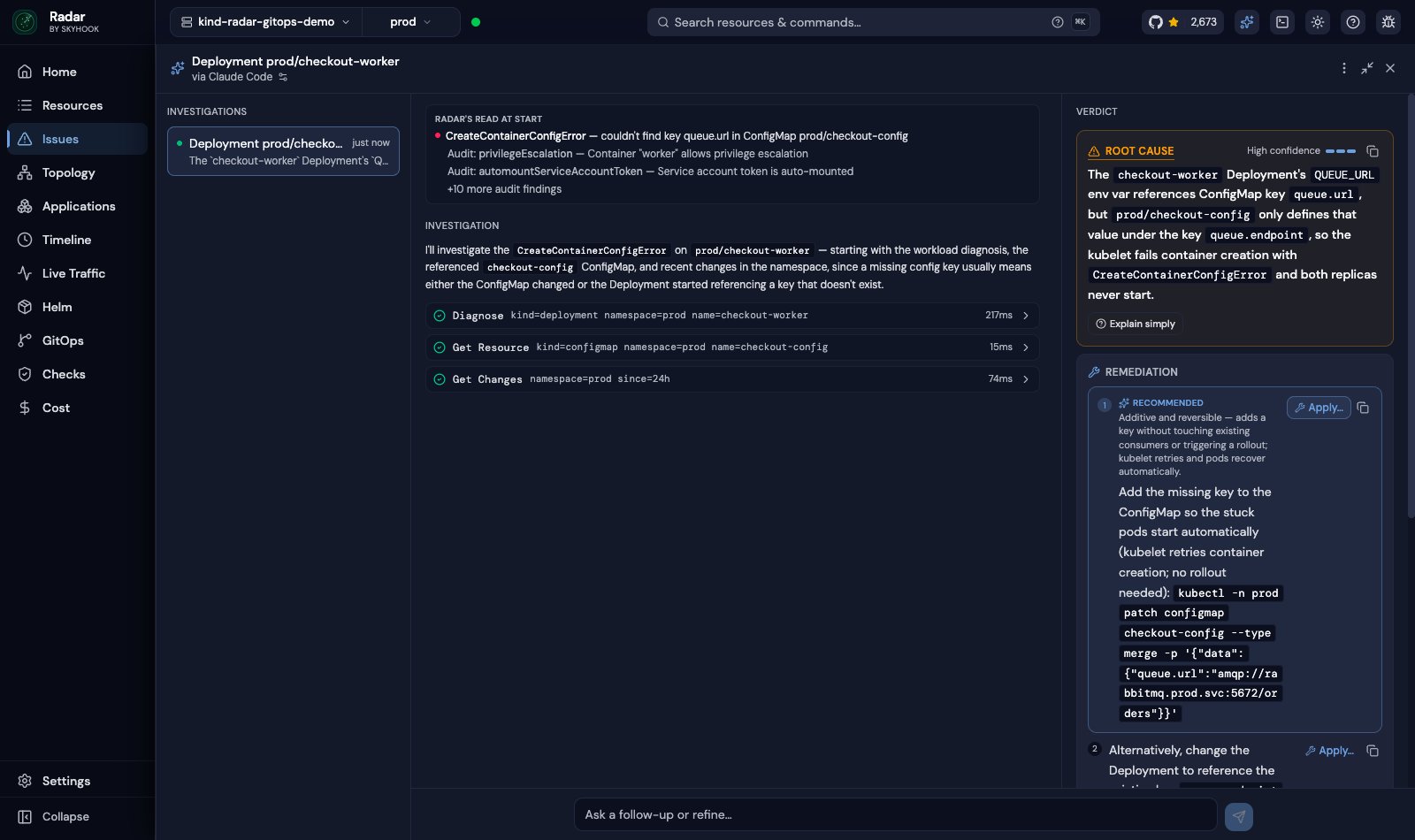
Investigation results with evidence and recommended next steps
Applying a fix
Apply is deliberately separate from investigating:- The confirmation dialog shows the exact change that will run and states that the agent will modify your cluster using your kubeconfig credentials
- An approved fix runs in a fresh write-enabled session bound to that one confirmed change - content the agent read during the investigation cannot steer what gets written. Apply without a confirmed fix is rejected
- Changes to GitOps- or Helm-managed resources require an extra acknowledgment: a direct change is reverted on the next sync, so the durable fix belongs in the Git source
- After an apply, Radar re-checks the resource’s health rather than declaring success
- If the agent nominates no safe step, there is no Apply button at all - remediation stays copy-only
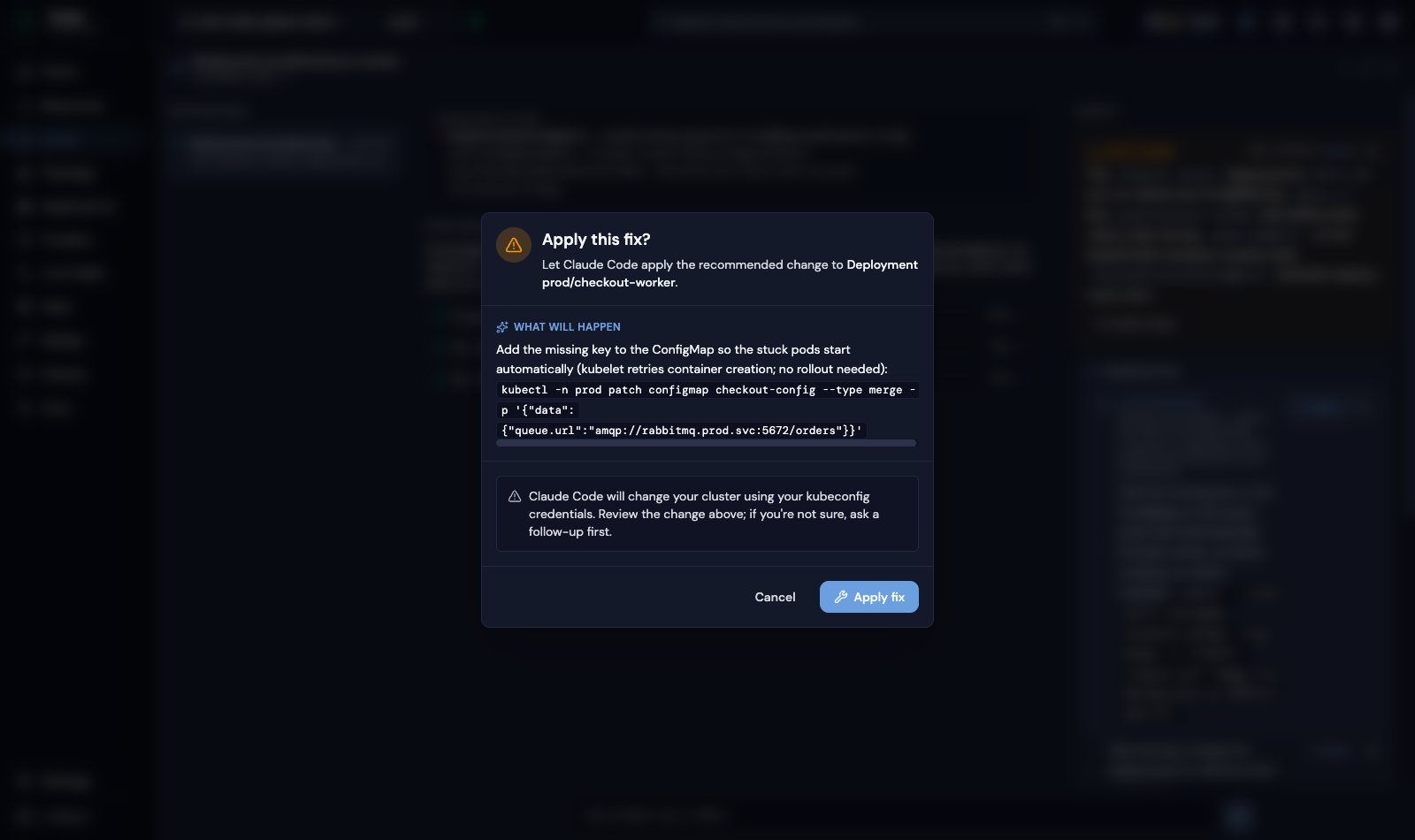
Apply shows the exact change before anything runs - in a separate write-enabled session
Agents and isolation
Configure it under Settings → AI investigations (preferences are per-browser; consent is per-machine, stored server-side):
- Agent - shown when more than one supported CLI is installed. Gemini CLI is detected and listed, but can’t be selected yet. Reload the page after installing another CLI, or use the recheck in the setup notice
- How Radar runs it - the execution profile, safeguarded vs full local, where the agent supports both (Cursor and OpenCode are full-local only); each choice spells out what is and isn’t constrained for that agent
- Model - Claude offers version-stable aliases (
opus,sonnet,haiku); Codex and Cursor take a free-text model slug; OpenCode takes aprovider/modelname fromopencode models - Reasoning effort - Codex only
- Clear history - wipes finished runs; live runs survive
RADAR_AI_TURN_TIMEOUT (default 15m per turn), RADAR_AI_MAX_TURNS (default 15 model turns), RADAR_AI_CLI_BIN (force a specific agent binary).
Privacy and consent
Nothing about an investigation touches Radar’s servers - runs execute on your machine, and Radar has no key, account, or telemetry in the loop. What the agent reads does go to your model provider (Anthropic, OpenAI, Cursor’s backend, or the provider configured in OpenCode) under your own account; the consent card states this before the first run instead of burying it. Consent is acknowledged per machine, enforced server-side, and re-requested if the disclosure ever changes.History (local)
Runs persist to~/.radar/ai-runs.db (SQLite, file mode 0600) so transcripts and verdicts survive restarts - retention is 100 runs or 30 days, whichever comes first. Runs interrupted by a restart are marked as errored rather than resumed silently; Cursor sessions cannot be resumed across restarts. Disable persistence with --ai-history=false, and clear it any time from Settings → AI investigations → Clear history.
Investigations in Radar Cloud
In Radar Cloud, investigations run hosted: open a cluster and start an investigation from the same UI - no agent CLI, no API key, nothing installed in your browser or on your machine. The agent appears as Radar Hub (cloud) in the agent picker, and its consent card describes the hosted data flow before the first run. How the hosted form differs from local:- Where it runs - each investigation turn runs as a sandboxed, single-purpose job inside Radar Cloud’s infrastructure, using a Radar-managed model. Your cluster is read over the same tunnel your dashboard already uses
- Read-only, enforced outside the agent - the job reaches your cluster through a short-lived, org- and cluster-scoped, read-only credential held by a separate gatekeeper process; the agent container itself holds no credentials, and write tools are refused fail-closed at that gate
- Requests you make use your access - starting an investigation or asking a follow-up uses your Kubernetes permissions, including when you follow up on an alert-triggered investigation
- Radar 1.16.0+ required - both user-started and alert-triggered investigations need this version on the cluster
- Alert-triggered turns use separate access - they read as
radar:ai:reader. See AI investigation access for default permissions and how to restrict them - No Apply - hosted investigations never write to your cluster. The verdict gives you the remediation; you run it through your normal change process
- Transcripts persist in Radar Cloud - runs are durable and multi-turn: follow-ups resume the same investigation, and history survives restarts and browser sessions
- A workspace, not a panel - every investigation has a stable link and lives in the organization’s investigations workspace with its history; Findings and charts are the same as in OSS
- Private until you share - investigations you start are visible only to you until you share them with the organization. Organization members can then read the whole transcript and continue or stop the investigation. Only the starter can change its sharing. Owners can disable sharing of user-started investigations; existing shares become private and are not restored when sharing is re-enabled
- Shared results can exceed your access - the transcript contains what each asker’s permissions allowed them to read. Alert-triggered investigations are organization-visible from the start; human follow-ups use the asker’s access
- A budget you can see - Settings → Organization → AI & MCP shows the month’s usage as a percentage of the monthly investigation budget. When automatic analysis is enabled for the organization, a second meter shows its usage against its own share. Automatic analysis pauses when its share is spent while manual investigations continue; when the whole budget is spent, both wait for the month to reset
On a self-managed Hub
With Radar Cloud Self-Managed, you run the control plane on your infrastructure. Here, the hosted engine is strictly opt-in (off unless you enable it in the chart) and calls the model through your own provider account - Anthropic, Amazon Bedrock, or Google Vertex AI. Each turn runs as a sandboxed Job in your cluster, and the model credential lives only in a sidecar broker for the provider you select. The chart’s NetworkPolicy allows outbound HTTPS on port 443 to any destination, not only your provider; restrict it further with an egress proxy or a CNI policy that filters by destination. Investigations stay within your boundary: your Hub, your cluster tunnel, your model account. Setup, per-provider values, and adding it to an existing install are in Self-Managed AI investigations.Troubleshooting
- No Investigate button (local) - Radar is running with auth enabled (the BYO form is standalone-only), or no supported agent CLI was found on
PATH - Agent CLI errors - failures from the underlying CLI (login expired, version too old) surface in the panel with the action to take
- 403 when starting a run - the consent card for the resolved agent hasn’t been acknowledged on this machine yet