

helm binary needed), so every release shows up automatically. From there you can see what’s running, understand failed deployments, compare revisions, upgrade, rollback, or uninstall.
What you see
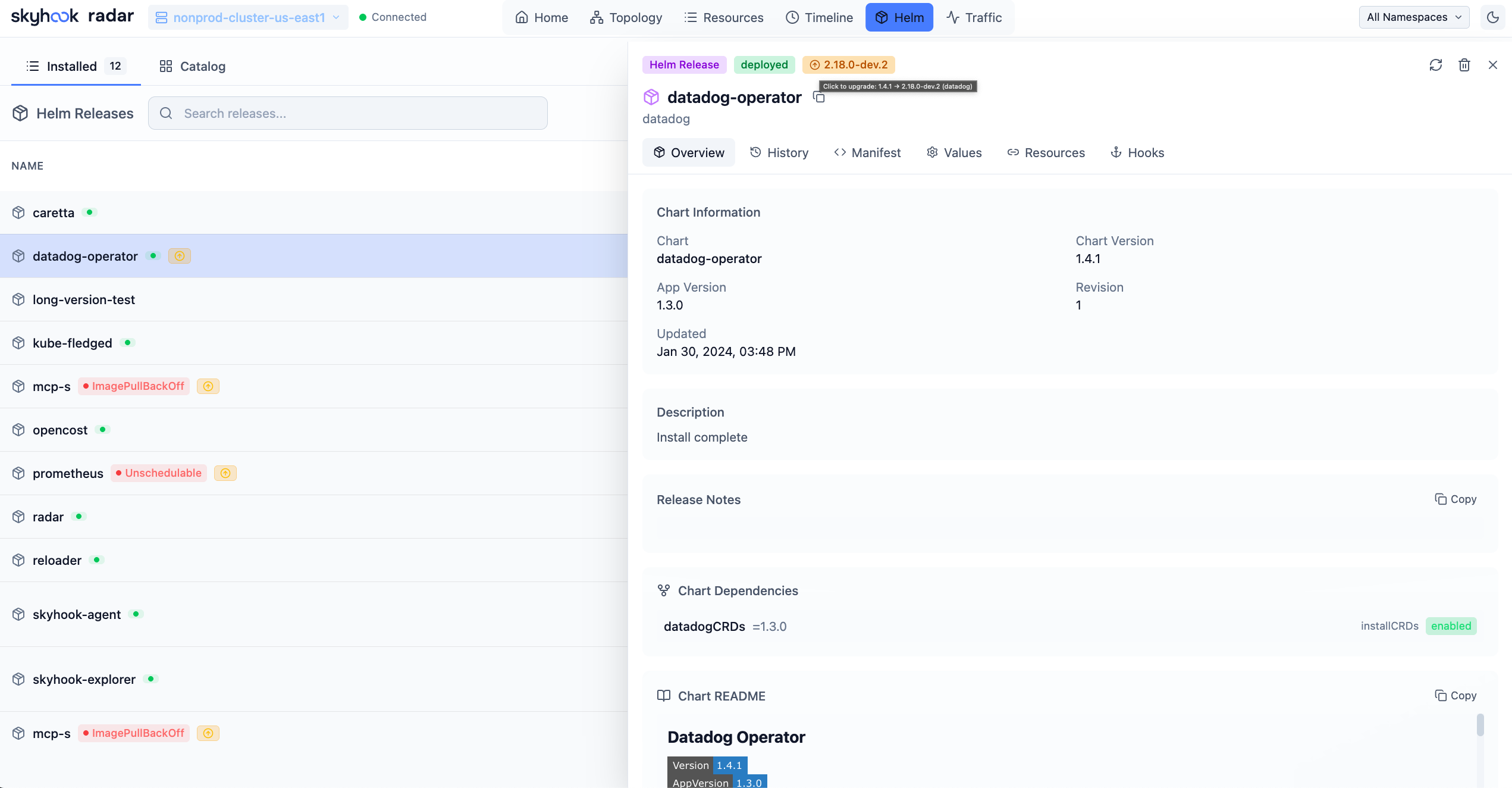
The Helm view lists every release, scoped to namespace or cluster-wide:- Release name, namespace, chart, chart version, app version.
- Status (
deployed,pending,failed). - Revision number and last deploy time.
- Owning resources (Deployments / StatefulSets / etc. that the release manages).
- Operation signals for failed installs or upgrades, stuck pending operations, and rollback-after-failure sequences.
- Source and ownership signals, including Flux-managed releases and releases whose upgrade source cannot be resolved.
- Overview - chart metadata, release description, source state, current operation insight, and the best live resource to inspect when Helm recorded a rollout failure.
- Resources - every K8s resource in this release, linked to its row in the resource browser.
- Values - the user-supplied values, side by side with the chart defaults.
- Manifest - the fully rendered manifest as Helm produced it.
- Notes - the chart’s
NOTES.txt. - History - all revisions with timestamps, descriptions, and a per-revision diff.
Compare revisions
Each revision shows a structured diff against the previous one, and you can pick any two revisions to compare across values, rendered manifest, notes, hooks, and resources - not just adjacent ones. Compare opens a full-page workspace so the rendered output has enough room to be useful:- Manifest diff - line-by-line YAML diff of the rendered manifests. This is the source of truth when the chart changed names, labels, templates, or object identity.
- Rendered resource inventory - a compact index of which Kubernetes objects were added, removed, or changed in place. When object identities do not overlap, Radar says so and points you back to the manifest diff instead of pretending it can pair unrelated objects.
- Field-level resource changes - for objects that can be paired by kind, namespace, and name, Radar highlights meaningful spec changes such as image, probes, replicas, selectors, and ports.
- Values diff - which user-supplied values changed.
- Notes diff - changes to the chart’s
NOTES.txt. - Hook evidence - hook metadata and any retained Job / Pod / Event / log evidence associated with failed or running hooks.
Upgrades, rollbacks, uninstalls
Read-only mode: pass
--disable-helm-write (or run without rbac.helm) and the action buttons disappear; you still see everything.
Diagnosing failed upgrades and hooks
When an upgrade goes wrong, Radar reconstructs what happened from release history instead of leaving you to read raw revision rows:- Failed upgrades and atomic rollback. Helm doesn’t persist whether
--atomicwas set, so Radar infers an atomic-style rollback from the revision sequence - a failed upgrade revision followed by a deployed rollback that points back to the previous release - and surfaces it as one operation (failed revision, rollback revision, target revision, and the failure description Helm recorded) rather than an ordinary healthy rollout. - Stuck pending operations. Pending installs, upgrades, and rollbacks get called out as active Helm operations, not just generic Kubernetes readiness problems.
- Likely resource to inspect. When Helm’s failure description names a live Kubernetes object, Radar links that object and shows its readiness/status signal so you can move from release history to the resource that blocked the rollout.
- Hook forensics. For a failed or running hook, Radar shows the hook’s identity, path, weight, lifecycle events, and last-run phase, and correlates the live Job / Pod / Event evidence plus short, secret-redacted log snippets when your identity can read them.
- Best-effort evidence. Hook delete policies,
ttlSecondsAfterFinished, garbage collection, or RBAC can remove the Job / Pod / Event / log data after Helm records the phase. Radar says when evidence is unavailable instead of pretending the hook didn’t fail.
Version-aware upgrades
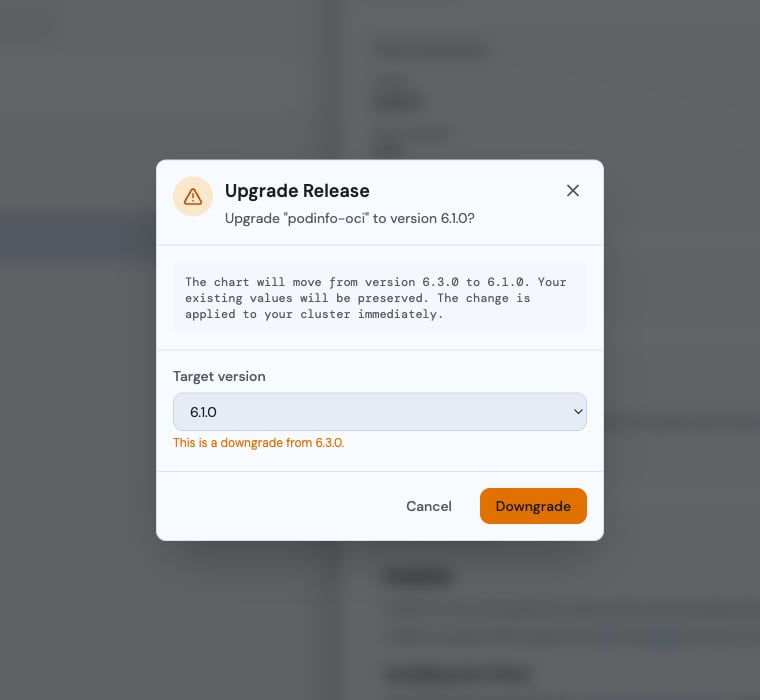
When a newer chart version is available, the release shows an update badge. The upgrade dialog lets you pick a specific target version - not just the latest - from the newest 50 versions (type to filter). Selecting a version older than what’s installed is labelled as a downgrade. Upgrades run with Helm’s--reset-then-reuse-values, so your previously-supplied values are preserved while the new chart’s new default keys are picked up (plain --reuse-values can render nil for keys a newer chart added).
Tracking upgrades
Radar checks each release against the chart sources it can see and flags when a newer version exists:- Configured Helm repos - the same
repositories.yamlyourhelmCLI uses (fromhelm repo add). Radar reads the cachedindex.yaml, matches by chart name, and shows the newest available version. Runhelm repo update(or use Refresh in the dialog) if the cache is stale. - Registered OCI sources - for charts installed from an OCI registry; see below.
Hosted and in-cluster Radar deployments may not have the same local Helm repository cache as your laptop. When Radar cannot resolve an upgrade source, it marks the source as unresolved instead of guessing. Release inspection, history, manifests, values, hooks, and operation diagnosis still work because they come from the Helm release secrets stored in Kubernetes.
Tracking your own charts (OCI)
Helm doesn’t record where a chart was installed from, and OCI registries have nohelm repo add equivalent - so a release installed with helm install oci://... shows source not tracked instead of an upgrade badge.
Click that badge to open Track chart source and register your registry prefix once - the OCI analog of helm repo add:
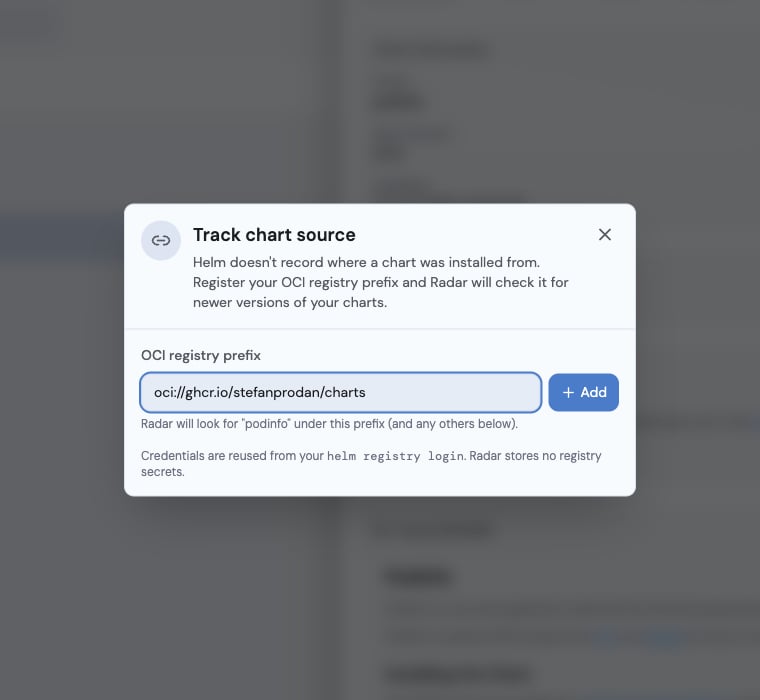
<prefix>/<chartName> for every untracked release and lights up the normal upgrade flow. Matching is by chart name, so a single org/registry prefix covers all your charts published under it. Registered prefixes are global to the Radar instance (not per-cluster, not per-release).
Credentials are reused from your existing helm registry login - Radar stores no registry secrets of its own, and only registries you explicitly register are ever probed.
Running Radar in-cluster? There’s no
helm registry login store in the pod, so only public OCI charts can be tracked today - the Track chart source dialog says so. Private-registry credentials for in-cluster Radar are not yet supported.GitOps-managed releases
If a release was installed by Flux’s helm-controller, a directhelm upgrade would be reverted at the next reconcile. Radar detects this, shows a Managed by Flux chip, and routes you to the GitOps view to bump the version in Git - rather than offering an in-place upgrade that wouldn’t stick.
AI and MCP
Radar exposes the same Helm context to AI agents through MCP:list_helm_releasesreturns release status, resource health, Flux ownership, current operation insight, and a capped operation trail.get_helm_releasereturns detailed release data, owned resources, history, operations, hooks, and hook diagnostics. Include diff options to compare revisions.issuesincludes active native Helm failures and stuck pending operations askind=HelmRelease,group=helm.sh.get_changesincludes native Helm release deployment history withsource: helm, so agents can answer “what changed before this broke?” without scraping the UI.
Concurrent edits
If two operators try to upgrade the same release at the same time, Helm’s own lock (the releasepending-upgrade state) wins - Radar surfaces the conflict instead of silently overwriting. Failed upgrades show the failure reason and offer a one-click rollback.
See also
- Resource browser - every Helm-managed resource shows its release.
- GitOps (Flux & Argo) - if you’d rather manage Helm declaratively.
- In-cluster deployment -
rbac.helmopt-in.