> ## Documentation Index
> Fetch the complete documentation index at: https://radarhq.io/docs/llms.txt
> Use this file to discover all available pages before exploring further.
# CloudNativePG
> PostgreSQL clusters run by CloudNativePG: which cluster needs attention and why, what each instance is doing, whether you could actually restore, and day-2 operations that are reviewed before they run and followed until the outcome is observed.
Available in Radar v1.17.0+
When the [CloudNativePG](https://cloudnative-pg.io/) operator is installed, Radar adds views for your PostgreSQL clusters: which cluster needs attention and why, what each instance is doing right now, whether its backups would actually let you restore, and the day-2 operations - switchover, restart, fencing, hibernation, backups, restore - behind a review that shows exactly what will be written. It replaces stitching the story together from ten CRD lists, `kubectl cnpg status`, operator logs and a Grafana dashboard.
## Where it lives
CloudNativePG stays under **Resources**; there is no new top-level navigation item. When the `postgresql.cnpg.io` CRDs are discovered, the CloudNativePG group in the Resources sidebar gains a **Views** block above its resource kinds:
| View | What it answers |
| - | - |
| **Clusters** | Every PostgreSQL cluster with readiness, replication, storage, backups and its top problem, ordered by urgency. |
| **Backups** | Recovery evidence per cluster, recent backup runs, schedules with their last outcome, destinations. |
| **Declarations** | Databases, roles, publications and subscriptions by cluster - declared versus reconciled. |
| **Pooling** | PgBouncer Poolers and the clusters they front. |
| **Operator** | Whether the operator is leading, watching and reachable, and its plugins and image catalogs. |
Sidebar badges count affected clusters, not findings, and follow the namespace filter. Opening the Cluster kind from anywhere - search, a favorite, a link from Issues - lands on the same Clusters view.
## Clusters
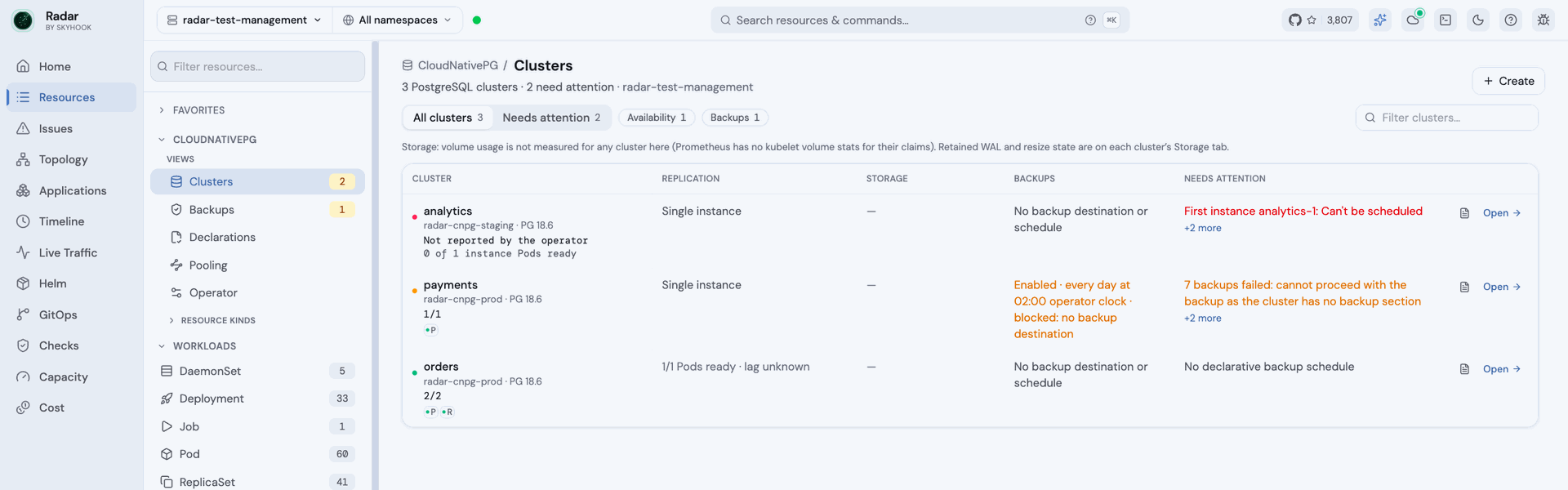
The fleet: every cluster you can see, worst first. **Needs attention** narrows the list to clusters with a warning-or-worse problem on the Cluster, its instance Pods, the Jobs it runs, or an object that references it. Each row names its top problem in words, so you can tell an unschedulable first instance from a failing backup schedule without opening anything.
 ## The Cluster page
Each cluster's page is organized by task, and each tab is the one home of its facts:
| Tab | What it holds |
| - | - |
| **Overview** | What needs attention, then one line per health dimension, PostgreSQL version and every operator condition. |
| **Replication** | One card per instance - role, timeline, streaming state, how far behind each standby is - plus the high-availability configuration. Instance actions live here. |
| **Storage** | Volumes and their usage, what is holding WAL, and resizing. |
| **Performance** | Sessions and connection headroom, the lock-blocking tree, per-database health, and history charts. |
| **Backups** | Recovery evidence, backup runs, schedules, and restore. |
| **Activity, Logs** | Events and changes; logs merged across instances. |
| **Configuration** | How to connect, PostgreSQL parameters as declared and as each instance reports them, and certificates. |
Four health dimensions follow you on every tab: **Serving** sits on the title line, and **Replication**, **Storage** and **Backups** mark their tabs - a dot when something needs a look, a hollow ring when it could not be assessed, nothing when it is fine. A broken cluster leads with its cause.
## The Cluster page
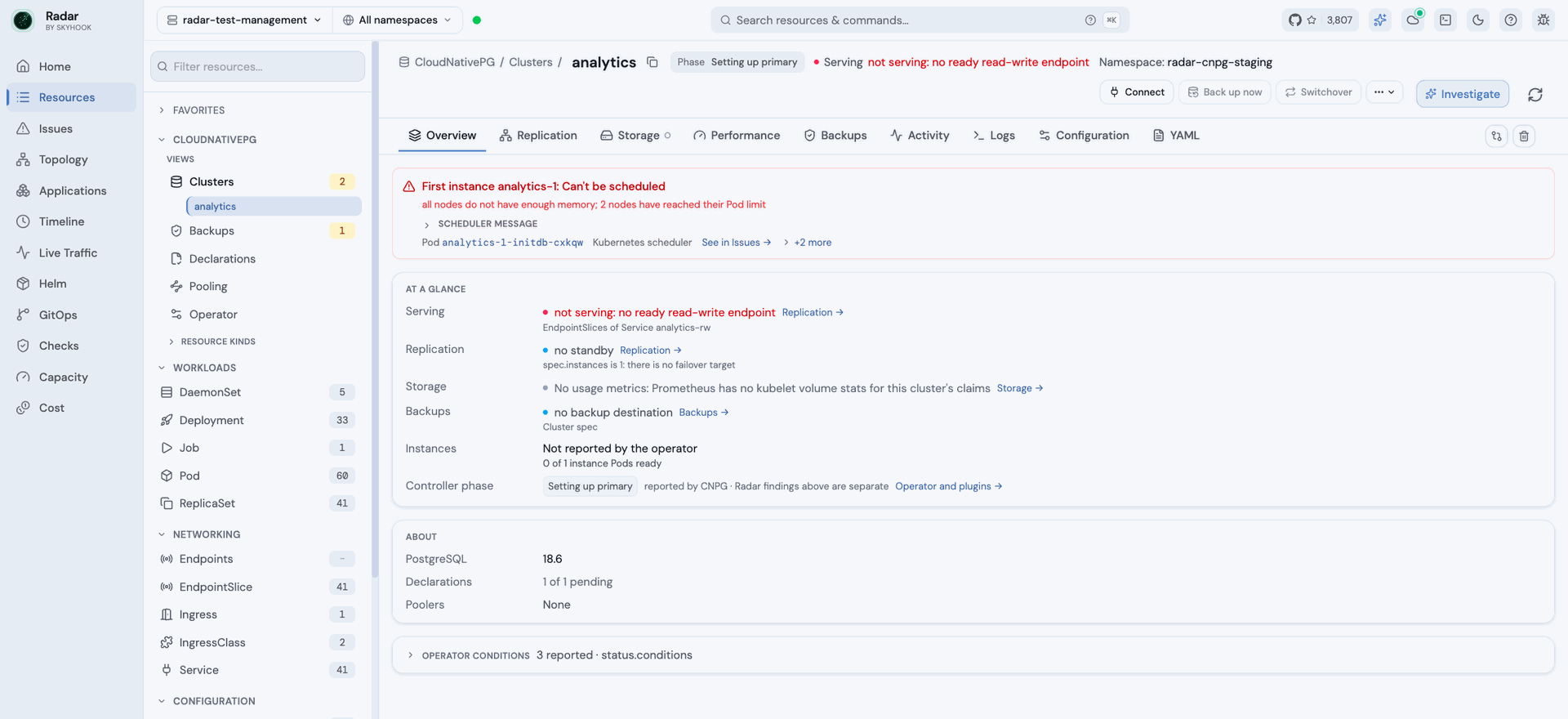
Each cluster's page is organized by task, and each tab is the one home of its facts:
| Tab | What it holds |
| - | - |
| **Overview** | What needs attention, then one line per health dimension, PostgreSQL version and every operator condition. |
| **Replication** | One card per instance - role, timeline, streaming state, how far behind each standby is - plus the high-availability configuration. Instance actions live here. |
| **Storage** | Volumes and their usage, what is holding WAL, and resizing. |
| **Performance** | Sessions and connection headroom, the lock-blocking tree, per-database health, and history charts. |
| **Backups** | Recovery evidence, backup runs, schedules, and restore. |
| **Activity, Logs** | Events and changes; logs merged across instances. |
| **Configuration** | How to connect, PostgreSQL parameters as declared and as each instance reports them, and certificates. |
Four health dimensions follow you on every tab: **Serving** sits on the title line, and **Replication**, **Storage** and **Backups** mark their tabs - a dot when something needs a look, a hollow ring when it could not be assessed, nothing when it is fine. A broken cluster leads with its cause.
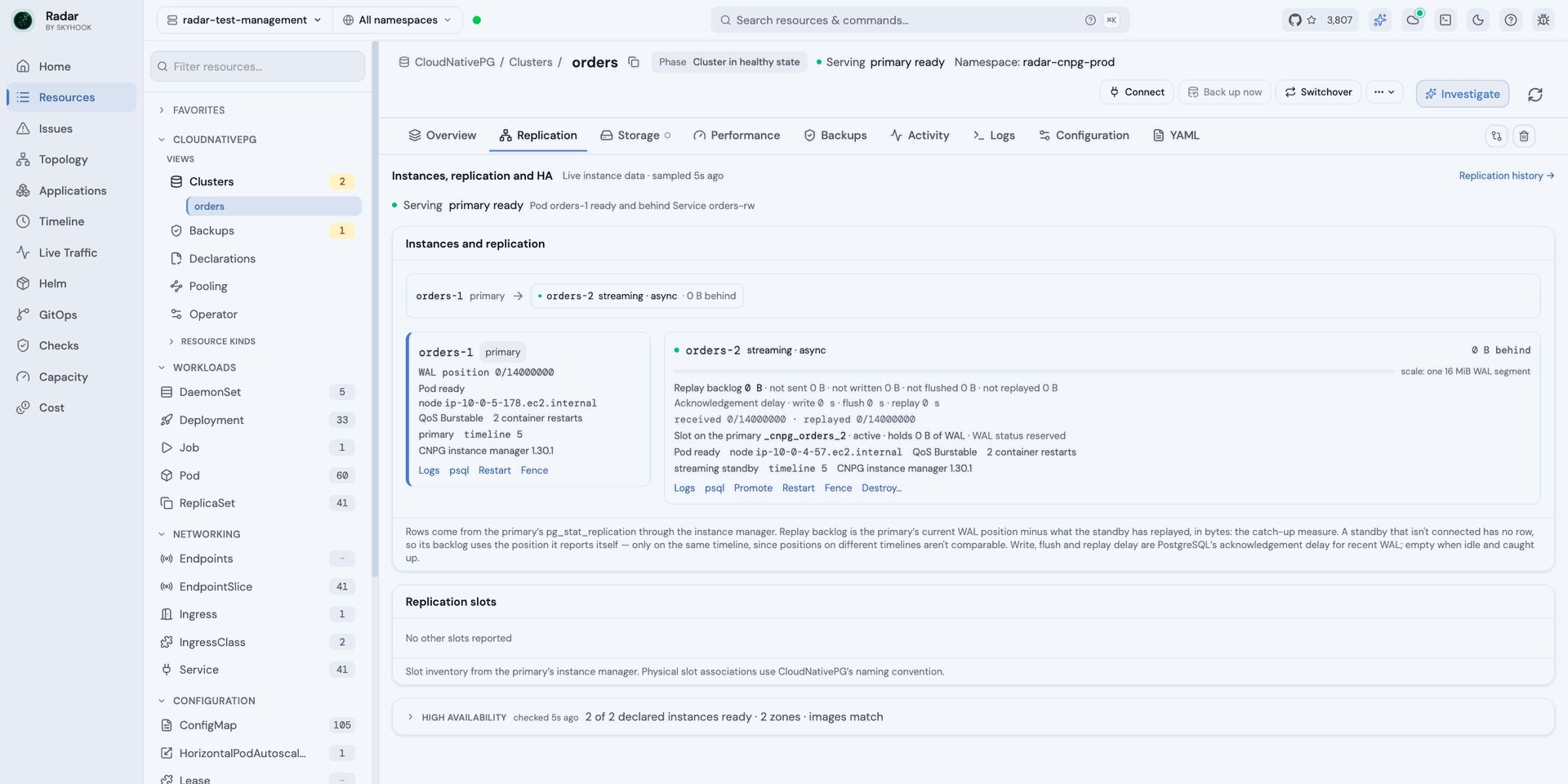
 Replication measures each standby's catch-up as **replay backlog in bytes** - the primary's WAL position minus what the standby has replayed. PostgreSQL's `replay_lag` is an acknowledgement delay that reads zero for a standby that receives nothing, so Radar never presents it as catch-up time.
 ## Operations that are reviewed and followed through
Day-2 operations run with your own Kubernetes identity, never Radar's:
* **Back up now**, **switchover**, rolling or single-instance **restart**, **reload**, **fence** and lift fence, **hibernate** and rehydrate, node **maintenance**, ScheduledBackup suspend, resume, edit and run now, Pooler pause and resume, cancelling or terminating a blocking session, and destroying a standby.
* Every dialog leads with the effect, keeps the literal API write one click away, and asks you to type the cluster name for disruptive actions.
* The request carries the facts you reviewed - the context, the cluster's identity, the current primary, the fence. The server re-reads them and refuses if anything changed in between, and nothing is retried automatically.
* Writes to objects a GitOps tool manages show whether the next sync is likely to revert them.
## Operations that are reviewed and followed through
Day-2 operations run with your own Kubernetes identity, never Radar's:
* **Back up now**, **switchover**, rolling or single-instance **restart**, **reload**, **fence** and lift fence, **hibernate** and rehydrate, node **maintenance**, ScheduledBackup suspend, resume, edit and run now, Pooler pause and resume, cancelling or terminating a blocking session, and destroying a standby.
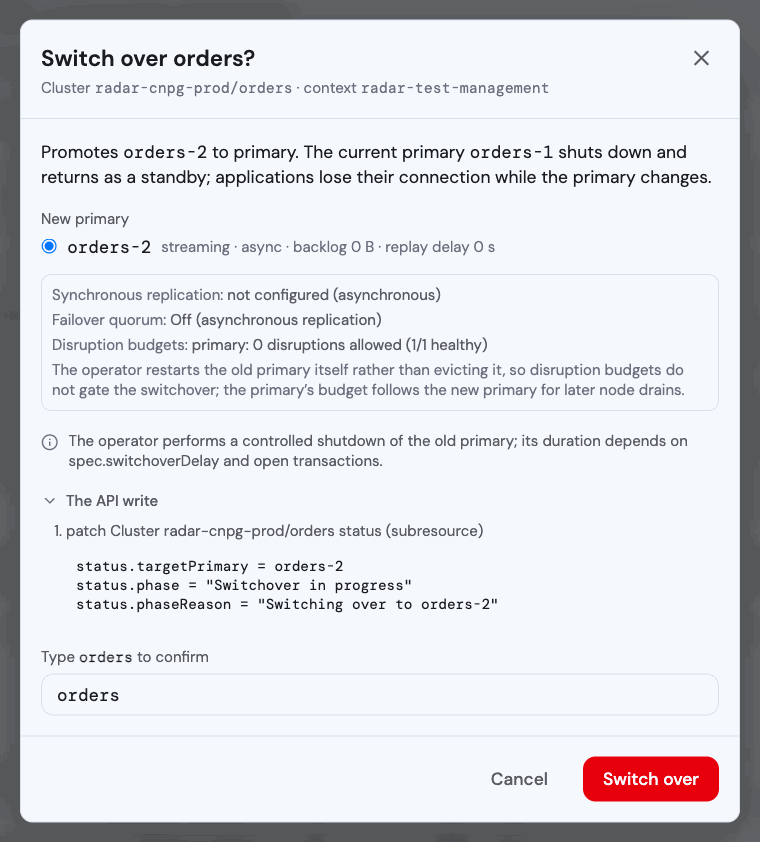
* Every dialog leads with the effect, keeps the literal API write one click away, and asks you to type the cluster name for disruptive actions.
* The request carries the facts you reviewed - the context, the cluster's identity, the current primary, the fence. The server re-reads them and refuses if anything changed in between, and nothing is retried automatically.
* Writes to objects a GitOps tool manages show whether the next sync is likely to revert them.
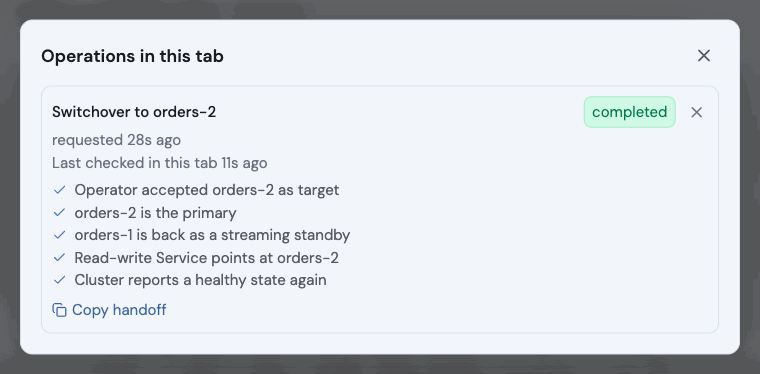
 An accepted request is not a finished operation. The cluster header follows each operation until Radar observes the outcome, and completion is judged step by step on evidence. A step Radar cannot see keeps the operation **unobservable**, never completed.
 ## Backups and recovery
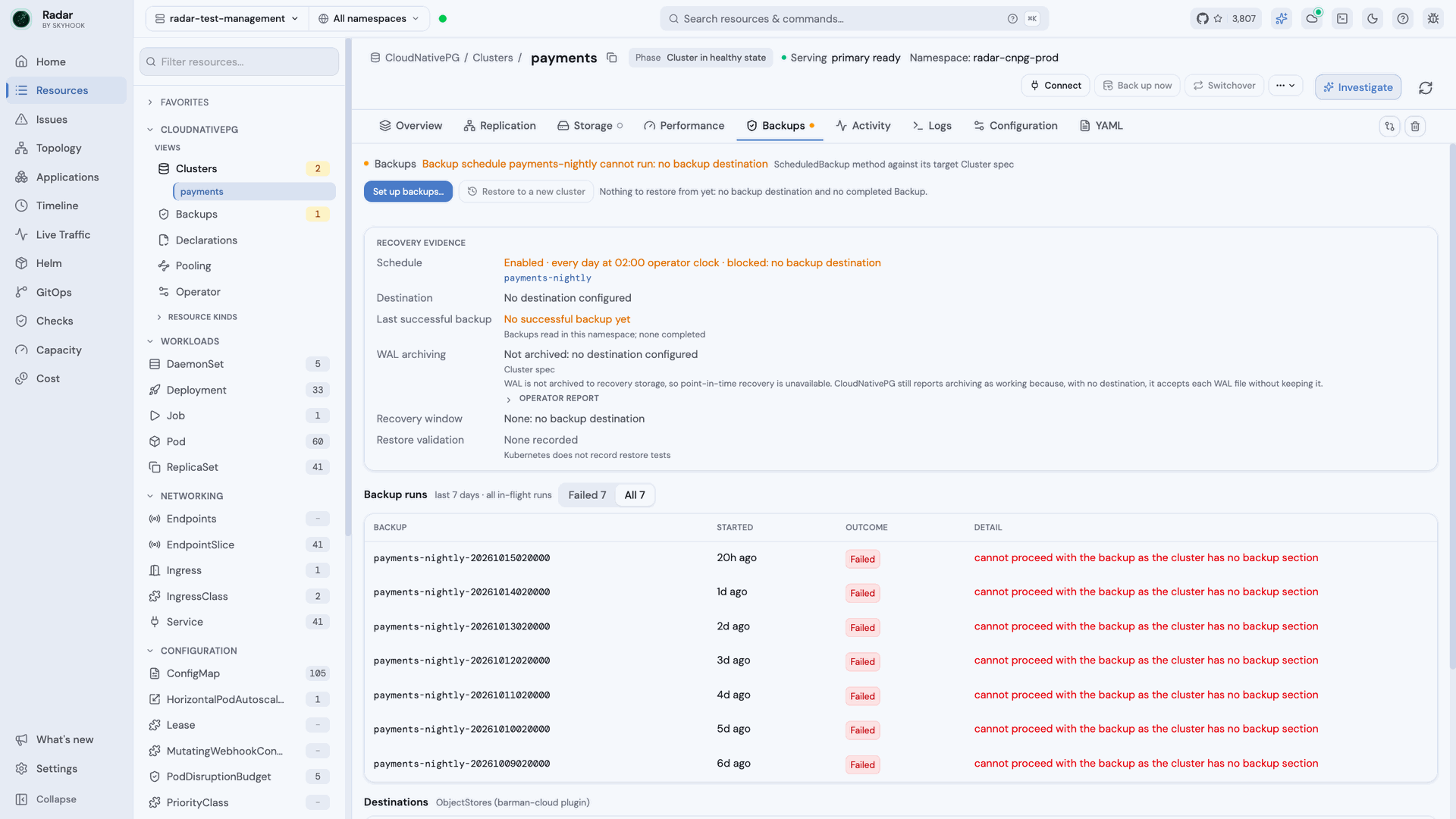
The Backups tab answers the question that matters in an incident: could you restore, and to when? It shows the schedule, the destination, the last successful backup and where that fact came from, WAL archiving, the recovery window, and whether anyone has validated a restore. It catches the setup that looks fine and is not: with no destination configured, CloudNativePG still reports WAL archiving as working, because it accepts each WAL file without keeping it.
## Backups and recovery
The Backups tab answers the question that matters in an incident: could you restore, and to when? It shows the schedule, the destination, the last successful backup and where that fact came from, WAL archiving, the recovery window, and whether anyone has validated a restore. It catches the setup that looks fine and is not: with no destination configured, CloudNativePG still reports WAL archiving as working, because it accepts each WAL file without keeping it.
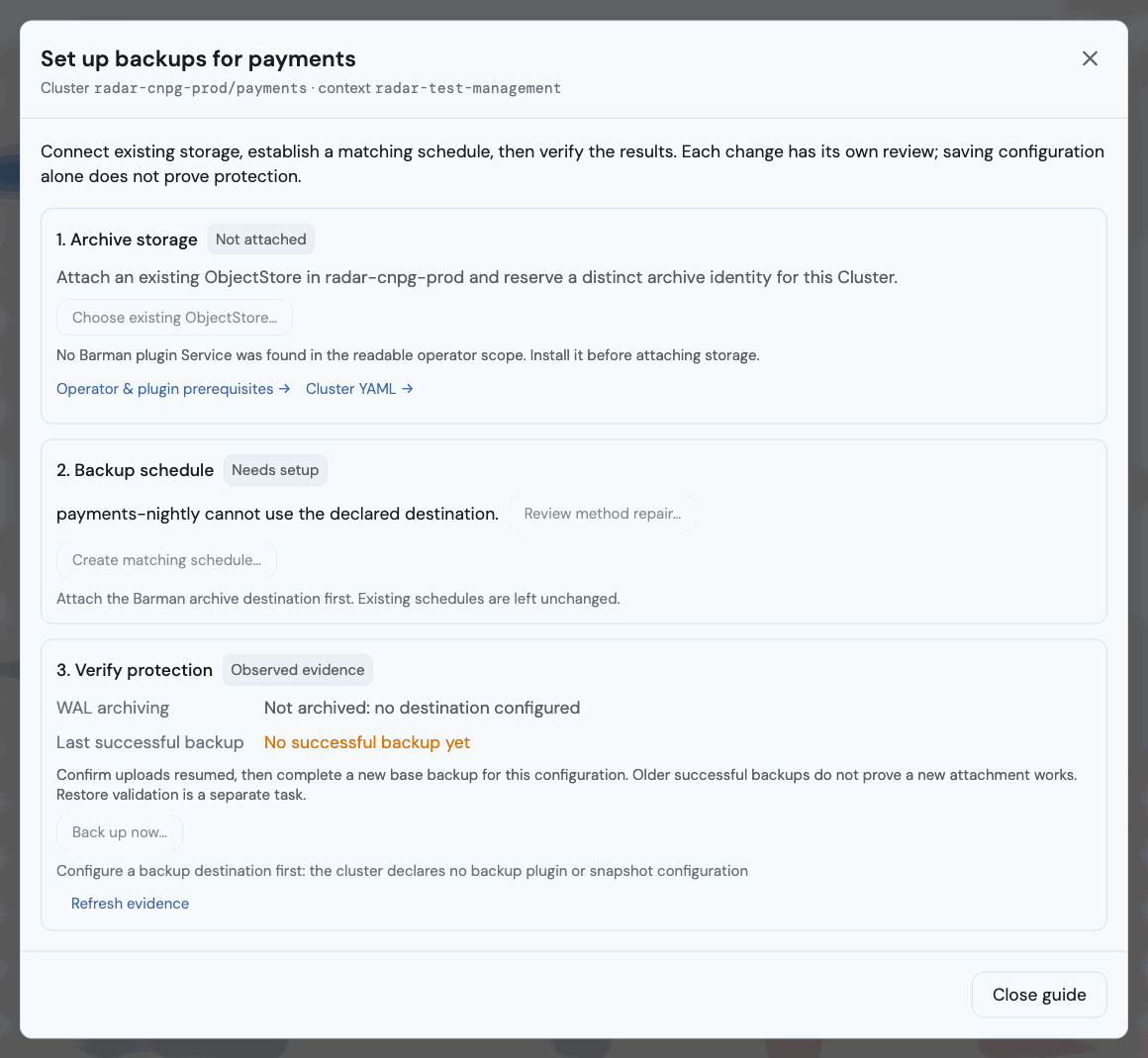
 **Set up backups** guides the three steps: attach an existing Barman ObjectStore with an archive identity reserved for this cluster, create or repair a matching schedule, then verify that uploads resumed and a new base backup completed. Each change has its own review; saving configuration alone is never shown as protection. Radar does not create object storage or credentials.
 **Restore to a new cluster** starts from a cluster, a Backup or an ObjectStore. You choose the latest point, a point in time or the end of a backup, and see what the source actually holds. A target outside the available evidence is warned about, never blocked. The restore is followed until the new cluster has a ready instance, and someone can then record what they checked as a restore-validation note on the cluster.
## Connect and create
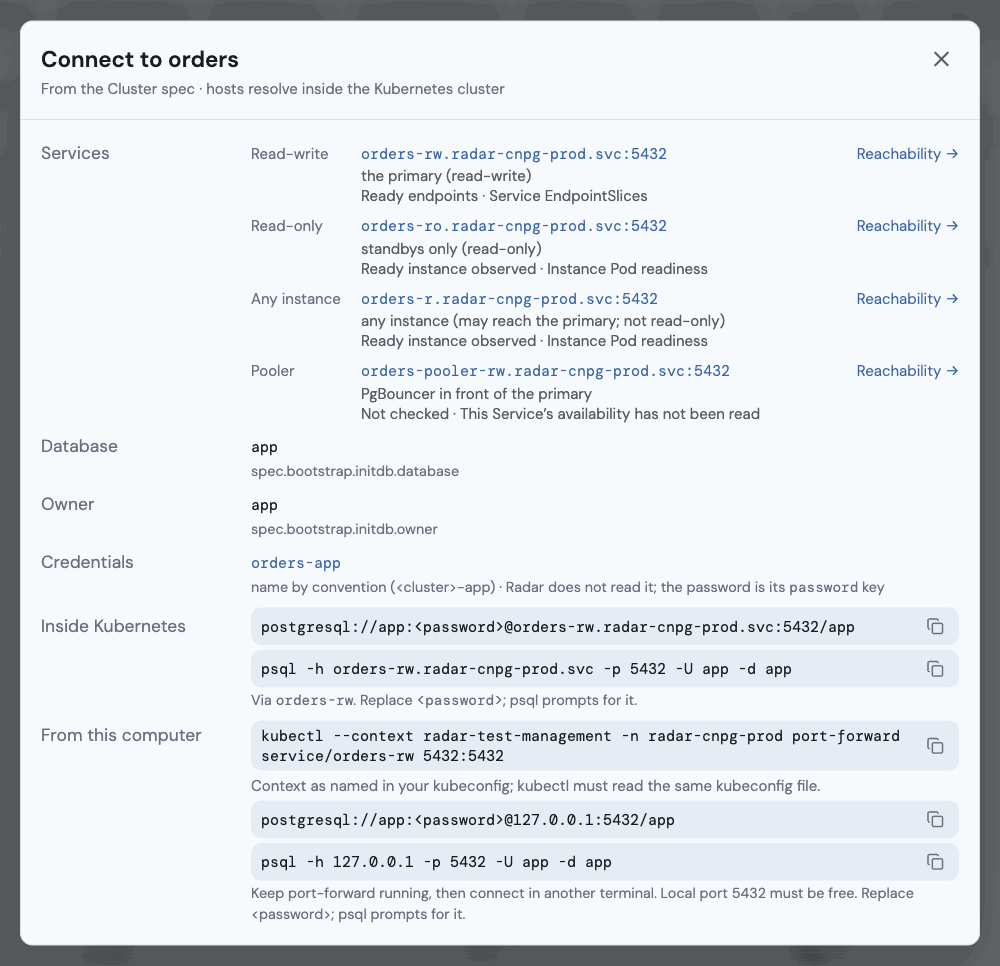
**Connect** lists every address for the cluster - read-write, read-only, any instance, and each Pooler - with whether the cluster's own Services currently have ready endpoints, plus copy-ready connection strings and `psql` commands. Credentials are named, never read: the password stays a placeholder.
**Restore to a new cluster** starts from a cluster, a Backup or an ObjectStore. You choose the latest point, a point in time or the end of a backup, and see what the source actually holds. A target outside the available evidence is warned about, never blocked. The restore is followed until the new cluster has a ready instance, and someone can then record what they checked as a restore-validation note on the cluster.
## Connect and create
**Connect** lists every address for the cluster - read-write, read-only, any instance, and each Pooler - with whether the cluster's own Services currently have ready endpoints, plus copy-ready connection strings and `psql` commands. Credentials are named, never read: the password stays a placeholder.
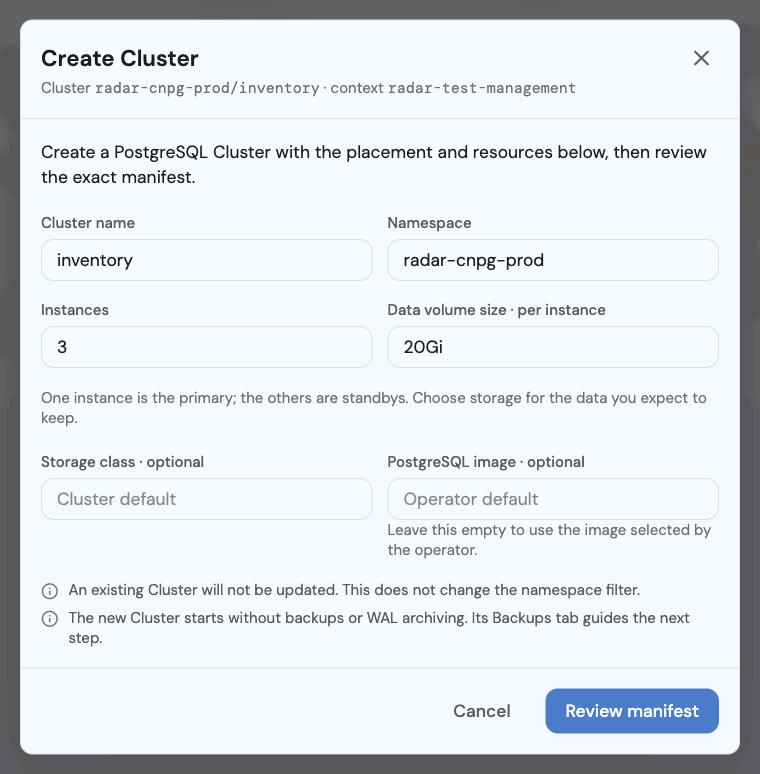
 **Create** guides a new cluster's name, namespace, instance count and volume size, then opens the exact manifest for review. It can never update an existing cluster.
 ## Operator
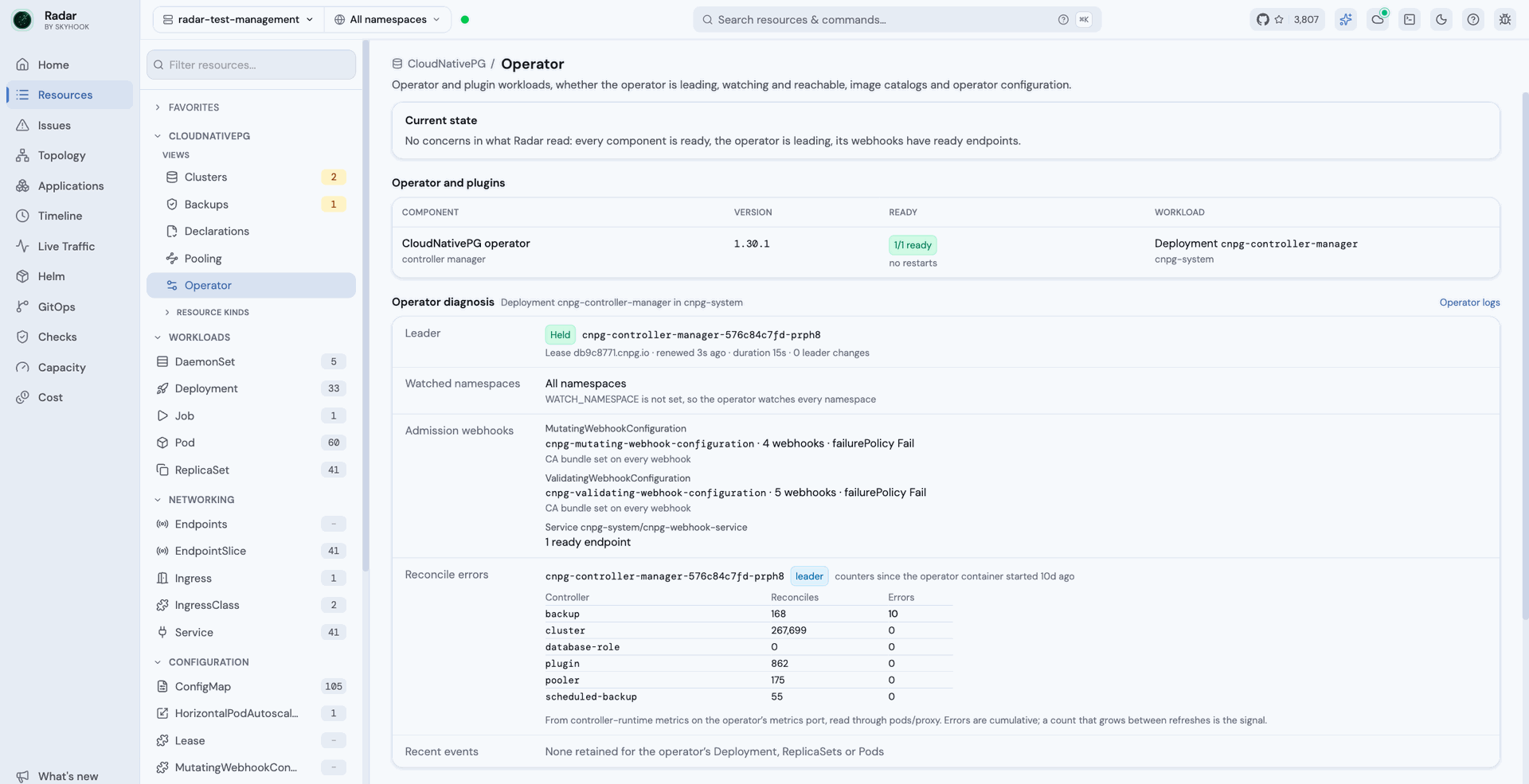
The Operator view answers whether CloudNativePG itself is healthy: whether the operator holds its leader lease, which namespaces it watches, whether its admission webhooks have ready endpoints, and reconcile errors per controller. When the operator is not reconciling, every cluster page says so before any status it shows. While its webhook is rejecting writes, actions that go through it are refused up front.
## Operator
The Operator view answers whether CloudNativePG itself is healthy: whether the operator holds its leader lease, which namespaces it watches, whether its admission webhooks have ready endpoints, and reconcile errors per controller. When the operator is not reconciling, every cluster page says so before any status it shows. While its webhook is rejecting writes, actions that go through it are refused up front.
 ## Reading the values
Every value is something the cluster reports, labelled with where it came from. When something cannot be read, the page says so - it never shows zero, "none" or green in its place:
* **Unknown is never healthy.** A standby whose lag cannot be read is "lag unknown", not caught up.
* **Partial is never exact.** When some namespaces could not be read, counts read as a lower bound (`≥N`).
* **No access names the permission.** A section you cannot read says which grant it needs, instead of looking empty.
## Access and data sources
Radar uses your own Kubernetes permissions throughout, and each part of a page is authorized separately: reading a cluster never implies reading its Secrets, Jobs or Pods.
* Live instance data - replication, slots, WAL, sessions - comes from each instance manager and PostgreSQL exporter through `pods/proxy`.
* The blocking view and `psql` use `pods/exec`; without it, those parts say so and the rest of the page still works.
* History charts come from Prometheus when it scrapes the CloudNativePG exporter. Without Prometheus, Radar samples while the page is open.
* Secret values are never read, including in the downloadable report bundle.
## Limitations
* **Restore validation is a human note.** Kubernetes records no restore tests, so a cluster is never shown as tested - only as validated by someone, with who and when.
* **Third-party backup plugins.** Destinations for plugins other than Barman Cloud are not modeled.
* **Single cluster.** Like the rest of Radar OSS, these views describe the connected cluster.
## See also
* [CloudNativePG integration](/docs/features/integrations/cloudnative-pg) - the per-kind detail views these screens build on.
* [Issues](/docs/features/issues) - where CloudNativePG problems also surface.
* [GitOps](/docs/features/gitops) - the write guard behind every action.
This documentation is built and hosted on [Mintlify](https://mintlify.com), a developer documentation platform.
## Reading the values
Every value is something the cluster reports, labelled with where it came from. When something cannot be read, the page says so - it never shows zero, "none" or green in its place:
* **Unknown is never healthy.** A standby whose lag cannot be read is "lag unknown", not caught up.
* **Partial is never exact.** When some namespaces could not be read, counts read as a lower bound (`≥N`).
* **No access names the permission.** A section you cannot read says which grant it needs, instead of looking empty.
## Access and data sources
Radar uses your own Kubernetes permissions throughout, and each part of a page is authorized separately: reading a cluster never implies reading its Secrets, Jobs or Pods.
* Live instance data - replication, slots, WAL, sessions - comes from each instance manager and PostgreSQL exporter through `pods/proxy`.
* The blocking view and `psql` use `pods/exec`; without it, those parts say so and the rest of the page still works.
* History charts come from Prometheus when it scrapes the CloudNativePG exporter. Without Prometheus, Radar samples while the page is open.
* Secret values are never read, including in the downloadable report bundle.
## Limitations
* **Restore validation is a human note.** Kubernetes records no restore tests, so a cluster is never shown as tested - only as validated by someone, with who and when.
* **Third-party backup plugins.** Destinations for plugins other than Barman Cloud are not modeled.
* **Single cluster.** Like the rest of Radar OSS, these views describe the connected cluster.
## See also
* [CloudNativePG integration](/docs/features/integrations/cloudnative-pg) - the per-kind detail views these screens build on.
* [Issues](/docs/features/issues) - where CloudNativePG problems also surface.
* [GitOps](/docs/features/gitops) - the write guard behind every action.
This documentation is built and hosted on [Mintlify](https://mintlify.com), a developer documentation platform.